


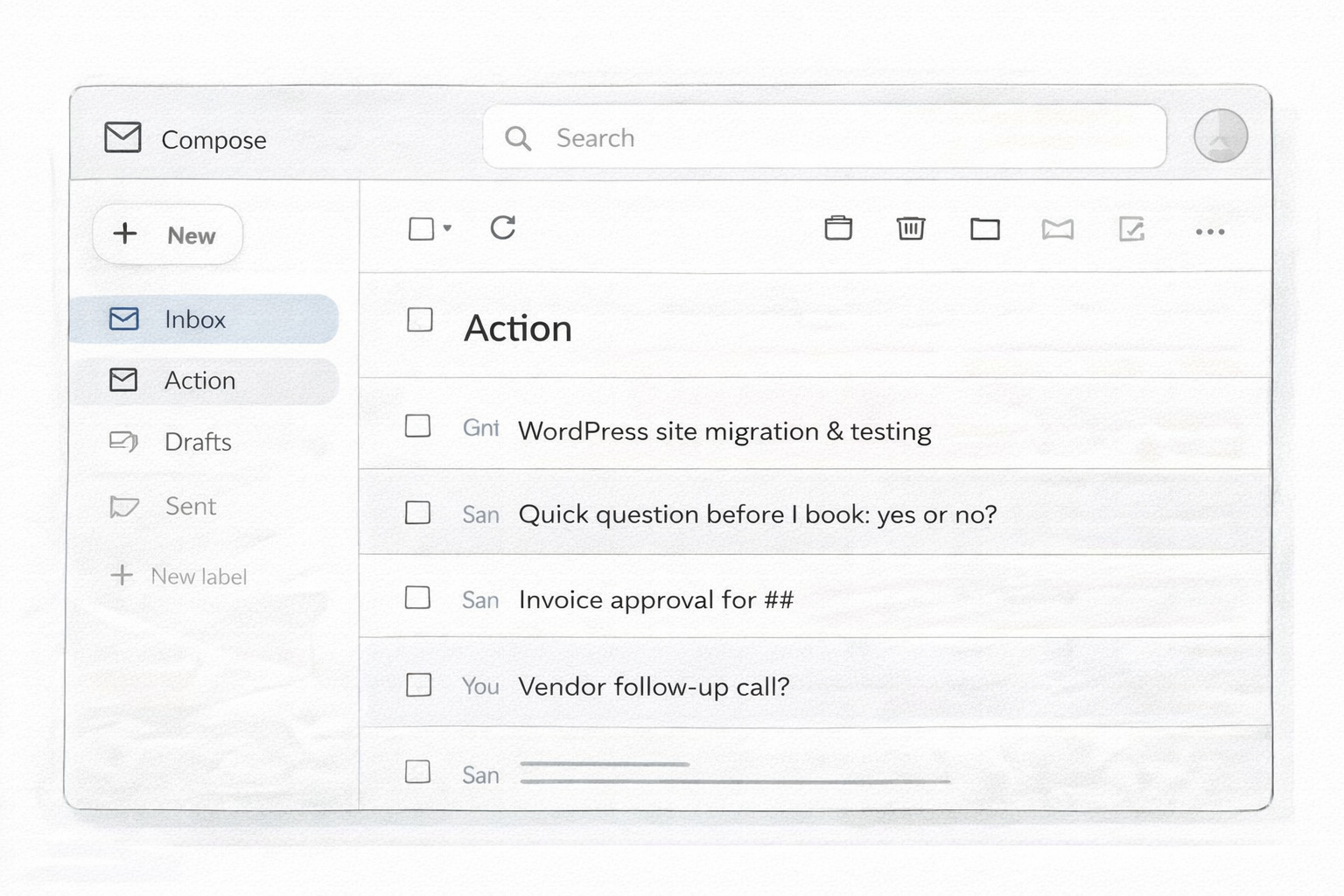
Sitting down with my morning coffee, it was time to go through the Action folder so I could set my day. But once I opened it, I could feel a new anxiety building.
This wasn’t supposed to happen anymore. I’d spent weeks getting the email triage dialed in — the cadence, the folders, the rules. I’d written about it. Publicly. The inbox was finally clean. I’d stopped compulsively refreshing Gmail to make sure I hadn’t missed something from a client. For the first time in a long time, email wasn’t running me.
But the Action folder was heavy.
A hefty WordPress migration that needed to go on the schedule, sitting above a two-minute yes-or-no for a different client, sitting above three emails I’d been circling for days, sitting above a vendor follow-up I’d promised on Tuesday. All flat. All the same visual weight. No way to tell at a glance what was a quick reply and what was going to eat two hours.
I sat there with my coffee and the familiar voice started up. Is this actually working, or did I just move the mess?
I tried to shake it off and be practical. Google Tasks was right there — same ecosystem, free, one click. I sent a handful of action items over and watched them land as context-free one-liners. No sender. No subject. No link back to the thread they came from. Just “follow up re: site” sitting next to “approve invoice” with nothing to tell me which was which or which mattered more.
They got stuck there. And I could feel the doubt spreading backward — if the Action folder isn’t working, maybe the triage isn’t working. Maybe the article I’d just written was premature. Maybe I’d built another system that looked clean on the surface and fell apart the second real work hit it.
That was the moment. Not the full folder. The fear that the thing I’d just told everyone was working was about to prove me wrong.

Gemini’s First Three Answers Missed
I opened Gemini.
Normally when I’m thinking through a problem, I go to Claude. That’s where I do most of my work. But this problem lived inside Google Workspace — the email, the folders, the triage rules — and I wanted the answer to live there too. Gemini is built into Workspace. If the answer was a script or a Sheet or some other Google-native piece, Gemini was already standing in the right room. So I went there instead.
I started by explaining what I wanted. A way to see what was in the Action folder at a glance. Enough context on each item to know whether it was a two-minute reply or a two-hour task. Nothing heavy. Nothing that added another login or another platform.
Gemini’s first response pointed me at a third-party ticket system.
Then, when I said no, it offered a lightweight project management setup in a separate app. Then a “productivity ticket system” built on top of something I’d never used. Every suggestion pulled me out of Workspace and into someone else’s ecosystem — another login, another subscription, another tool to learn and maintain for what should have been a small fix.
I pushed back. Told it I wasn’t leaving Google Workspace. The whole point of going to Gemini was that the answer should live where the problem lived.
Then it suggested a form.
The logic on paper wasn’t bad — a form clients could submit requests through, feeding a clean intake pipeline. Except my clients have been emailing me for years. Some of them for over a decade. I’m in the middle of rebuilding half my business right now. The last thing I need is to send a note to a long-term client that says “hey, instead of just emailing me like you always have, can you fill out this form.”
I pushed back again. The email isn’t the problem. The email is what’s working. The problem is what happens after the email hits the Action folder.
Eventually Gemini landed on the right neighborhood — what if we built this in a Google Sheet with a script running in the background?
Yes. That.
So I told it to build the spreadsheet.
What came back was a poor man’s version of what I actually needed. The columns were generic. The structure was thin. The drop-downs were missing context that anyone who’d worked an inbox for a week would know needed to be there. It was the kind of output that looks like a solution until you try to use it.
I stopped it. Told it I’ll build the spreadsheet — I just need the thinking behind it. Tell me what columns, tell me why, tell me what should be a drop-down and what should be free text. I’ll do the rest.
That shift was small but it mattered. I stopped letting Gemini execute and started letting it think with me. The columns got sharper. The drop-down logic got specific. When I mentioned that a single email thread often contains three separate asks — the original request, my clarifying question, the client’s reply — it handled it cleanly by numbering each email within the thread so nothing got lost.
But every useful piece of that system came on the other side of me saying no, not that.
Why AI Keeps Giving Generic Answers
Somewhere between the third pushback and the spreadsheet rewrite, it hit me.
Gemini wasn’t failing. I was expecting it to fail well — to read my mind, to know my business, to understand why I didn’t want a form and why I wasn’t leaving Workspace and why Google Tasks wasn’t enough.
It couldn’t know any of that. I hadn’t told it.
Every answer that missed was an answer built on the context I’d given it, which wasn’t much. “Help me organize the Action folder.” That’s not a brief. That’s a wish. With a brief that thin, of course the first swing was a third-party ticket system — that’s what the internet says to do when someone says “I need to organize tasks.” Gemini was reflecting the average answer to the average version of my question.
The work wasn’t in getting Gemini to be smarter. The work was in getting myself to be clearer.
Once I said it out loud — the triage is working, the email is working, the friction is specifically what happens after an email hits the Action folder, I’m not willing to leave Workspace, I’m not willing to ask clients to change how they contact me — the suggestions got smaller and sharper. Not because Gemini got better. Because the question got better.
I wasn’t waiting for a tool smart enough to figure me out. I was the bottleneck.
That’s the piece I keep forgetting and keep relearning. Every time I’ve had a frustrating conversation with an AI, I’ve gone back and looked at what I actually gave it to work with, and nine times out of ten the answer is not much. A vague goal. No constraints named. No mention of what’s already working, what’s already built, what I’d walk through fire to protect and what I’d happily throw away.
The AI can’t infer any of that. It’s not watching me work. It’s not sitting in my inbox. It doesn’t know I’ve been in the middle of rebuilding my business for months and the last thing I have bandwidth for is retraining my clients on how to reach me. It knows what I type.
So the recognition wasn’t about Gemini. It was about me finally seeing that the friction I kept feeling in AI conversations wasn’t the AI — it was the gap between what I knew about my own work and what I was willing to say out loud.
Staying in the Ecosystem That Already Works
Here’s what I used to believe about solving problems with AI: the goal is to find the right tool, then give it the task, then let it build.
That’s not quite right. The goal is to find the tool that lives closest to where the problem actually is, then bring it into your process instead of asking it to invent one for you.
The Action folder problem lived inside Google Workspace. The email, the folders, the triage rules, the clients themselves — all of it was inside Workspace. So the answer needed to stay inside Workspace. Not because I’m loyal to Google. Because every time a solution asks you to leave the room where the problem is happening, you pay a tax. You pay in logins. You pay in subscriptions. You pay in context-switching. You pay in one more place to check, one more system to maintain, one more thing that can break on a Tuesday when you don’t have the energy.
The system you need is the one that fits the process that’s already working. Not the one that replaces it.
Because here’s the other piece — I could have walked this exact problem into Claude Code and built an agent. I could have stood up something in CoWork that watched my inbox and wrote cards to a board. I could have turned an Action-folder problem into a multi-system architecture project and spent the next three weeks getting it just right.
That would have been using somebody else’s system. It would have been me reaching for the most impressive answer instead of the most fitting one. And fitting matters more than impressive. Fitting is what you actually use six months from now.
Staying in Workspace wasn’t a compromise. It was the whole point. The triage already worked there. The clients already lived there. The emails already lived there. Adding a Sheet that talks to Gmail via a small script didn’t add a new system — it extended the one I was already running.
And there’s a quiet bonus waiting at the end of that choice. Everything I’m building in Workspace speaks Google’s API natively. When I’m ready to bring this into the Chief of Staff dashboard I’m building, the data’s already in a format that can be pulled in cleanly. I didn’t have to plan for that. I got it for free by staying in the same neighborhood.
The System: A Sheet, a Script, and What It Actually Does
What I ended up with is almost embarrassingly simple.
A Google Sheet. A script running quietly in the background. That’s it. That’s the whole system.
The Sheet has columns for the things I actually need to see when I look at the Action folder: who’s asking, the subject line (which effectively becomes the ticket name), the priority, the thread number, a link back to the original email, and any links the email itself contained — a Dropbox folder, a Google Doc, a shared asset.
When a thread has multiple back-and-forths, each email in the thread gets its own number, so the context doesn’t collapse into a single flat row. The ask, my clarifying reply, and the client’s response each get their own line.
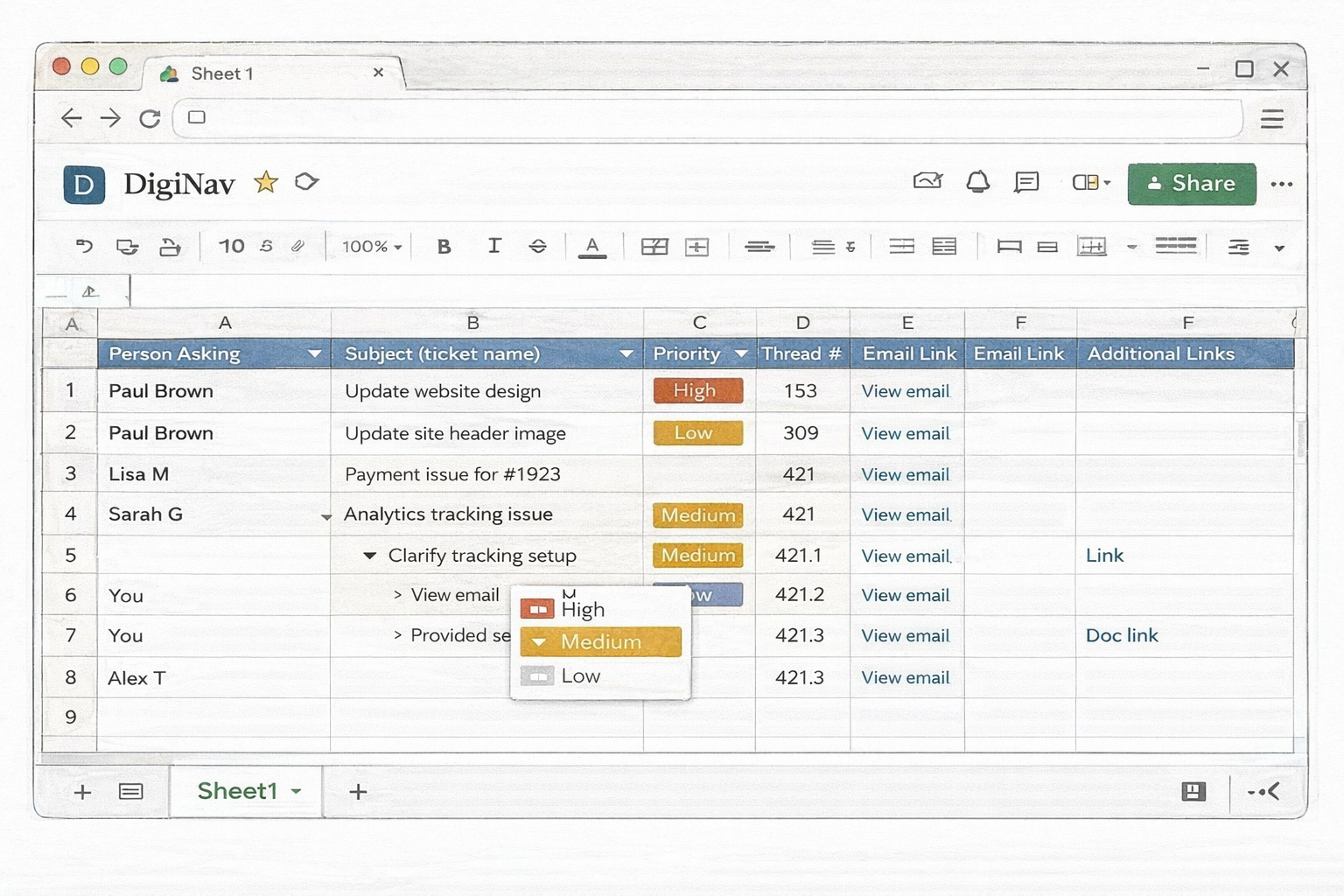
Drop-downs handle the categories where I was going to type the same thing over and over — priority, status, client. Everything else stays free text so the Sheet doesn’t fight me when a specific email needs a specific note.
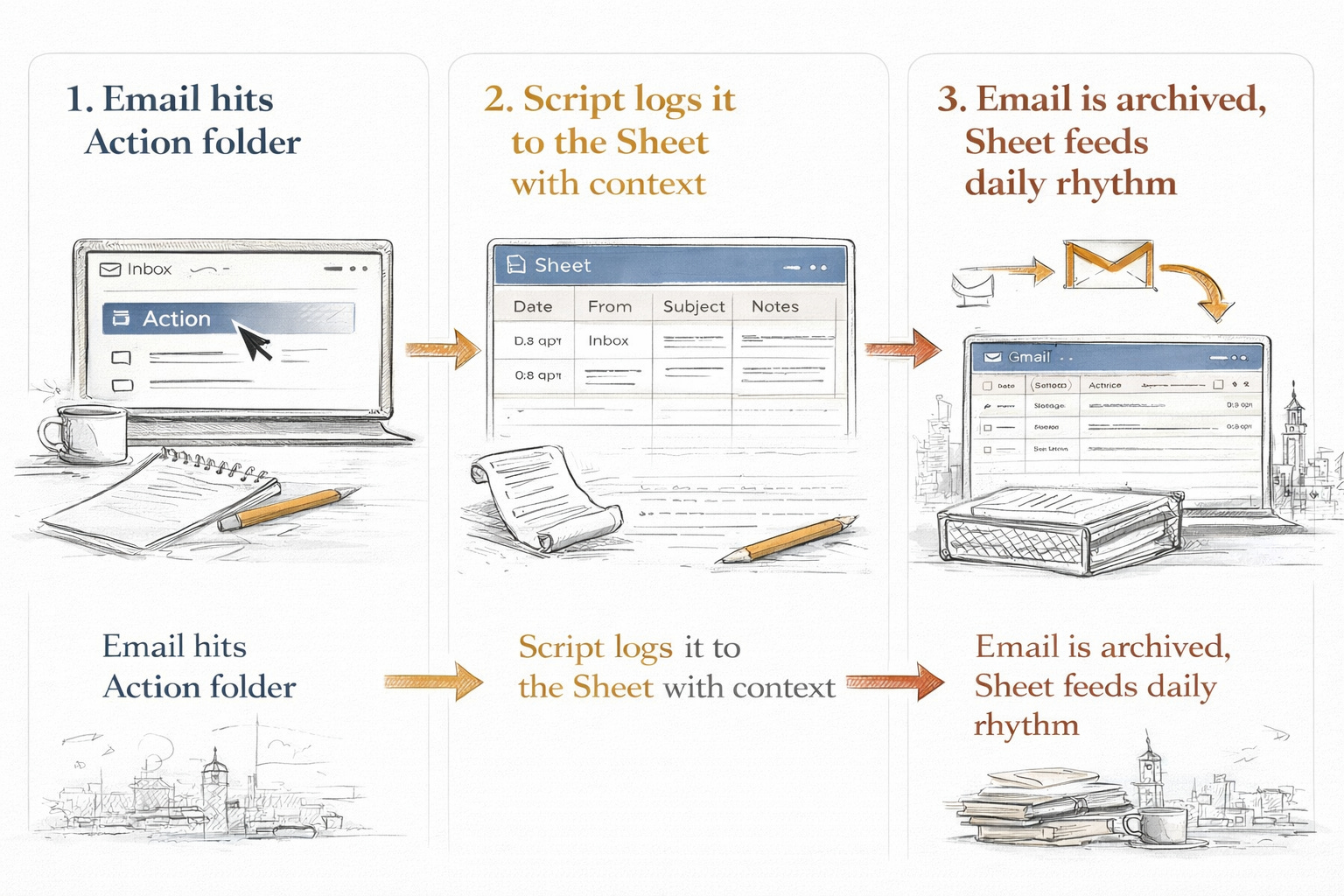
The script is what makes it actually work. It watches what hits the Action folder and populates the Sheet in the background. I don’t have to touch it. I don’t have to maintain it. It runs on Google’s infrastructure, inside the same ecosystem where the problem was.
And here’s the quiet payoff I didn’t fully see coming — because every action item is now captured in the Sheet, I can actually archive the email. The folder gets lighter. Nothing gets lost. The ask isn’t waiting in Gmail for me to remember it’s there; it’s already on the list, with context, ready to be worked. The email stops being the holding pen and goes back to being what it was supposed to be — the delivery mechanism.
And because the data lives in a Sheet, I was able to plug it directly into the daily rhythm I run every morning in CoWork. Instead of opening Gmail and scrolling the Action folder to figure out what the day looks like, I open the Sheet view inside my rhythm and see everything at a glance — sorted, prioritized, with context. The Sheet became a feed into a system I was already running, without me having to build any new connective tissue.
The pieces that fit tend to keep fitting. The pieces that don’t, don’t.
What I didn’t end up with matters just as much. I didn’t end up with a ticket system in ClickUp. I didn’t end up with a form for clients to fill out. I didn’t end up with an agent running in the background that I’d have to babysit every time Google changed an API. I didn’t end up with a Notion database that would have been beautiful and unused by month two.
I ended up with the smallest thing that does the job. And the smallest thing that does the job is the thing I’ll still be using a year from now.
None of this is to say the system is finished. It isn’t. I’ll tweak the columns as I notice what I’m actually using and what I’m ignoring. I’ll adjust the drop-downs when I realize a category is too broad or too narrow. I’ll probably find a piece of context I keep wanting that isn’t captured yet, and I’ll add a column for it. That’s how any process improves — the same way you refine an SOP, the same way you tighten up any part of the business.
What the automation piece gives me isn’t a finished product. It gives me a way to remove the friction of sorting and prioritizing so I can actually see what the next refinement should be. The system is version one. The point is that it works now — and because it fits, I can keep making it better without starting over.
The Skill Is the Pushback
All of this started because Gemini tried to send me somewhere else — another platform, another form, another system — and I said no.
The pushback is the part I want you to keep.
Not the spreadsheet. Not the script. Not the Google Workspace ecosystem. Those are mine. Yours might look nothing like this. Yours might live in Notion, in Airtable, in a stack I’ve never used. The specific tools are almost beside the point.
What matters is the posture. The willingness to interrupt the AI’s first answer and say no, not that — and then take the extra minute to explain why. The willingness to stay in the ecosystem that’s already working for you, even when the suggestion is to leave it. The willingness to describe your actual process out loud, including the parts that are messy and the parts you’re not willing to change, so the AI has something real to work with.
Most of the time, the friction I feel in an AI conversation isn’t the AI. It’s that I haven’t made the gap between what I know about my work and what I’m willing to say out loud small enough yet.
So here’s the question I want to leave you with:
When was the last time you pushed back on a solution that was recommended?
Sit with it for a minute. Not to answer it for me. Not to reply. Just to notice.
If this tension feels familiar, you may want to keep exploring from here.
Related Theme
Built For Someone Else: Building workflows that fit your actual business and energy instead of someone else’s blueprint.
Continue the conversation:
One thing to site with:
What part of your workflow already works — but keeps getting treated like the problem?
Thinking Through Something?
If you’re sitting with a decision, workflow, tool stack, or AI process that technically works but doesn’t feel quite right, I offer limited advisory sessions for solo business owners trying to sort through the noise without adding more complexity.