


A friend of mine loves to bake. Cakes, cookies, those little things she drops off that nobody ever turns down. But somewhere between the job, the side gig, the family and everything else life stacks on top — she was running out of time to do it. The baking wasn’t the problem. The process around it was eating the hours she didn’t have.
So I asked her: why not get ahead of it? Do the prep work in bulk when you have a window. Handle the time-consuming parts in advance, so when the hour finally appears, you’re not starting from scratch — you’re just baking.
She looked at me like I’d said something obvious. And maybe I had.
That conversation stuck. Because I’d been having the same one about my own business — just without the baking. Moving information from one place to another. Updating the same record in two tools. Copying what Claude produced into Notion, over and over.
The baking was fine. The prep work was the problem.
And the fix wasn’t somewhere else. It was already in the room.
The problem wasn’t what I had. It was what was missing between them.

The terminology was never built for you
You’ve probably heard this by now: connect your tools. Automate the repetitive stuff. Let AI handle it. Or maybe it comes with a list — MCPs, APIs, automation workflows. Someone making it sound like the logical next step.
And if you’ve ever looked at those words and thought, that’s not for me, you weren’t wrong to think it. For a long time, connecting apps required reading through developer documentation, understanding architecture, building the integration yourself. The barrier was genuinely technical. The conclusion — this isn’t in my lane — was a reasonable read of the situation.
But here’s what changed: everything around those terms did. The terms are the same. What they require from you isn’t.
MCPs. APIs. Skills. Plugins. These aren’t going away — if anything, you’re going to hear them more. But they’re no longer instructions for developers. They’re descriptions of how a system works. And once you understand what each one actually does, in plain language, the next question stops being can I even do this?
It becomes: where does this fit in what I’m already doing?
That’s a completely different question. And it starts with four definitions.
When Claude does the work... sort of
I had Claude do some of it. Updating records in Notion, pulling information across, and handling the pieces I didn’t want to do manually. And sometimes it was great — exactly what I needed.
Other times, it was inconsistent. Spotty results. Updates that half-landed. A process that worked well enough on a good run and let me down on the next.
The fix existed. I knew that. The problem was getting it to work reliably — and that meant setting things up properly, with the right connections in place.
And here’s why that matters for you — especially if you don’t have a technical background.
The path to fixing it runs through terms like MCPs, APIs, Skills, and Plugins. And for most people, that’s exactly where the conversation ends. Not because the concepts are complicated. Because the words signal: this requires a developer. This is not your lane.
That signal is wrong.
The terminology was built for a technical audience. It wasn’t built to keep you out — it just was never translated for someone who runs a business without a coding background. So you keep copying and pasting. You keep doing the manual steps. Not because you can’t use these tools, but because nobody handed you the plain-language version of what they actually mean.
That’s what this is.
Here’s what happens when the terms click.
You stop asking “can AI do this?” and you start asking “which piece handles this?” That’s a completely different question — and it opens up a completely different set of possibilities.
For me, that looked like setting up CoWork, not Claude Code. Most of the conversation has gone in that direction — it’s the more technical option. CoWork is the everyday version. The one built for exactly this: connecting Claude to the apps and spaces you’re already using, without needing a development background.
What I built was a simple connection. My experiment notes on my hard drive. My Notion workspace. My dashboard. My articles. CoWork became the layer that linked them, so Claude could reach across those spaces without me manually carrying the information between them.
Before CoWork, I had something similar running in regular Claude. And it was inconsistent in a specific way — sometimes it would create or update the Notion records exactly right. Other times, it would stop short and hand me code or text to copy and paste myself.
Which, if you think about it, is just the copy-paste tax wearing a different outfit. The connection between Claude and Notion was missing the piece that makes it reliable — the MCP, the API link. Without that, Claude was doing its best with what it had. Which wasn’t always enough.
The copy-paste process didn’t disappear because I found a smarter workaround. It disappeared because I had the right structure in place. Four terms. Four jobs. Each one handles a specific part of how the system works.
That’s what this understanding makes possible for you. Not a complicated build. Just a clear picture of what each piece does — and suddenly, the question isn’t whether you can do this.
It’s where do you want to start?
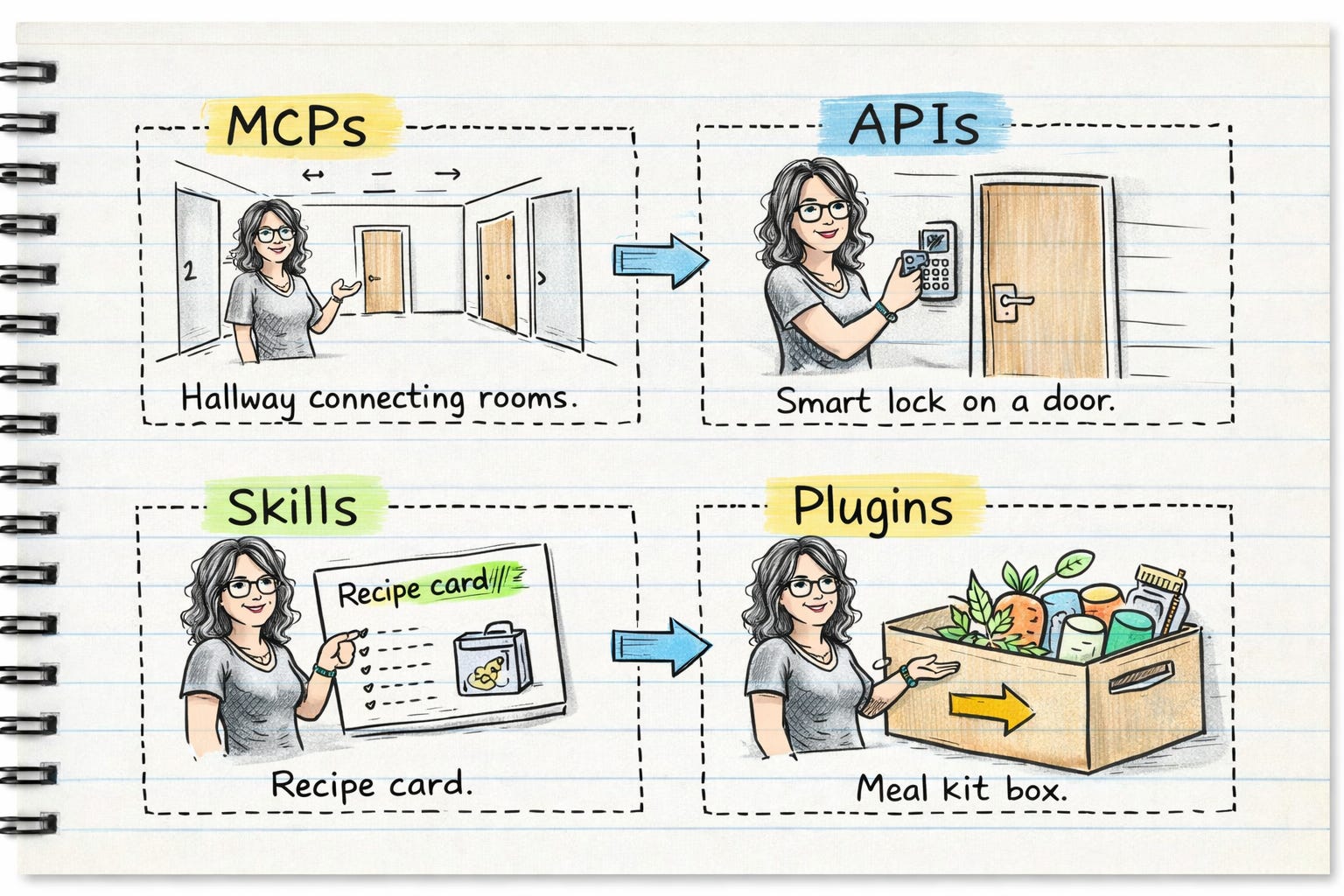
The four terms, in plain language
So let’s get into the four terms. Not the developer version. The version that actually makes sense for how you run your business.
MCPs — the hallway.
Your business doesn’t live in one room. It lives in Notion, in your inbox, in your calendar, in the documents on your hard drive. MCP is what builds the hallway between them. Without it, you’re the one carrying information from room to room. With it, the information moves on its own.
APIs — the smart lock.
You’re not handing anyone a key to your house. You’re giving controlled access — a code that works for a specific door, for a specific reason, and can be revoked whenever you want. The house stays yours. You just decided who gets through which door.
Skills — the recipe adapted for who’s cooking.
Same kitchen, same base. But a home cook improvises differently than a baker, who measures everything, because the chemistry matters. Skills are how Claude’s instructions get calibrated for the task at hand. What works for syncing documents is set up differently from what works for writing. Same foundation. Different precision depending on what’s actually being made.
Plugins — the meal kit.
Someone has already figured out the ingredients, the sequence, the portion sizes for a specific dish. You’re not building the recipe from scratch — you’re getting a pre-assembled package designed for one job. A sales plugin is a meal kit for prospecting. A marketing plugin is a meal kit for content.
Skills teach Claude how to cook. Plugins tell it what to make and for whom.
MCPs connect the rooms. APIs control who gets through which door. Skills are the recipe adapted for who’s cooking. Plugins are the meal kit — pre-assembled, one job, ready to go.
The companion piece walks through building each of these layers — what setup looks like, what to do with an API key, and how to build a Skill for a specific task. That’s where the how-to lives.
Here’s what staying manual actually costs.
Not in a dramatic way. Just in the quiet, steady way of doing the same task twice because the tools don’t talk to each other yet. Copying what’s in one place into another. Updating the record. Doing it again next week.
It’s not broken. It just never stops being your job.
The other cost is harder to see. It’s the possibilities that don’t show up because the vocabulary hasn’t landed yet. You can’t ask for a connection you don’t have a word for. You can’t build a system around terms that feel like they belong to someone else’s world.
The copy-paste tax is the visible one. The vocabulary gap is the invisible one. And they compound — the longer the terms feel inaccessible, the longer the manual process continues.
Noticing that friction isn’t weakness. It means you’re paying attention to where your time is actually going — and asking whether it has to.
It doesn’t.
Five things worth taking with you
If you only take away five things from this:
MCPs connect your tools. Without the connection layer, you’re the one carrying information between rooms. That’s the copy-paste tax — and it’s optional.
APIs are access keys, not developer tools. You give controlled access for a specific purpose. The house stays yours. Access is yours to grant and revoke.
Skills are how Claude’s instructions get calibrated for the task. Same base, different precision depending on what’s actually being made. A sync task and a writing task don’t run on the same settings.
Plugins are the meal kit. Someone already figured out the ingredients and sequence for a specific job. You’re not building from scratch — you’re deploying something pre-assembled for one purpose.
The barrier was never a technical skill. It was unfamiliar language. Once the terms land, the question changes from “can I do this?” to “where do I want to start?”
You’re allowed to find this hard.
Not because the technology is complicated. Because the language around it was built for a different audience — and nobody handed you the translation. So you watched the tutorials, heard the terms, and quietly concluded that this level of setup wasn’t for you.
That conclusion made sense with the information you had.
It’s just not accurate anymore.
The tools are there. The connections are possible. What changes first isn’t your setup — it’s the question you’re asking. And the question changes the moment the terms stop feeling foreign.
So here’s what I want to leave you with: what’s one process in your business where you’re still the one carrying the information? Not a general category — a specific thing. The task you do every week that moves the same data from one place to another, because the rooms aren’t connected yet.
That’s your starting point.
And once the terms land, the next question becomes which tool is the right fit for the job you’re trying to do. That’s a different conversation — and one worth having.
If you want to go further, the companion piece walks through building each of these layers, from what to do with an API key to how to build a Skill for a specific task. That’s where the how-to lives.
Oh my gosh thank you for these metaphors! I love learning this way. And for making these terms accessible and less daunting.