TL;DR: Choose where your files live based on who or what needs access, the devices you use, and whether you can move the work later. Check that access and test an export before moving everything in.
My organized briefcase still needed me
I've always been organized. Papers, years of tax returns, old statements, bank statements, and canceled checks. I kept it all.
So when Suze Orman came out with this organization system, a little briefcase with divider folders inside for all of the different documents you needed to keep for good financial health, I bought it. I was all in, and it was great.
I had this plastic briefcase, and I was able to put a lot of stuff in it and store it there.
The only problem was access. If anyone needed something, I had to physically go in, pull out the paper, send the paper to where it needed to be, and then put the paper back.
When it was just me, it was fine. But when it was my husband or anyone else, they had to learn my system. And my system was this plastic briefcase with these nice little neat divider sections.
There were so many papers in there that trying to find what you needed, even in the sections, became a futile effort. It took forever. Well, not forever, but it took a good while to sort through all of the papers.
Because even though it was sectioned, there was still a lot in there. There were papers for our home, and then papers for work, and then papers for the kids, and then papers for the family and other stuff. It was a lot of papers.
Then scanning became a thing. You could scan your documents and put them on a hard drive. That was the new thing, right? So I bought a portable scanner and started to scan everything. And then they went onto CDs, because back in the day that was the storage of choice. You burned stuff onto CDs.
So now, instead of having to root through papers, I had to root through CDs.
Then we got into memory sticks and hard drives, and that gave me even more options. Instead of CDs that could get scratched or broken, I had a hard drive or a memory stick that was easier to share without damage.
Fast forward all these years, and we have cloud storage and digital copies. Keeping information has never been easier, but there's still some separation.
Now my financial records are automatically pulled into my bookkeeping software, for both personal and business. It also brings in my credit cards and my investments, so I have everything in one place. It just funnels in electronically, instead of me having to open up each application and try to find the statement or the information.
With services like Zapier and Make, MCPs, and even API connections, it's easier to get information from point A to point B, if you know what that route is.
And that was the same problem I started to encounter when I started to work with multiple AIs and what got stored where.
Hi, I’m Lee. Welcome to DigiNav Compass Signal. Around here, I share what happens when AI and technology meet a real business—the useful parts, the messy parts, and what you can take into your own work.
Today, I’ll be showing you how to decide where your work should live when you use AI, so you aren’t stuck with one tool when something changes.
Two AIs needed the same work
Content Lab is the process I use to create these articles. Claude and Chat both help me create and refine them.
At first, it was Chat for this and Claude for that. A lot of it came down to allotments: I have this many tokens in this AI and this many tokens in that one.
The biggest change came when I started to really use both AIs as part of the process. I wanted to take the strengths of both of them, or even other sources like Midjourney and Gemini and the other tools I had access to.
So I started to think in who writes better, who thinks better, who researches better.
Maybe you're there too. One AI for writing, another for research, and your work spread out between them.
When working with two AIs separately, there was that separation. One picked up where the other left off, as a clear break.
But now there is back and forth: one for assembling the context, one for research and development, then the brief, move to another for writing, and back for images.
It's the back and forth to determine who has what role, and is everyone on the same page, instead of each hoarding and doing their own thing.
It's like working with a team who each have a home office.
And now AI is moving a lot of stuff to its own cloud. ChatGPT's Spaces let me share work with a person. But that doesn't tell me whether Claude can work directly with the same information there. And on Claude's Pro and Max plans, new Cowork sessions and scheduled tasks now run in the cloud, with the work saved to your Claude account. Older tasks that started on your computer stay there.
So I need to check two things: can another AI use the same work where it lives, and can I download or export a copy to use somewhere else? Getting a copy out is different from both AIs working with the same current information. That's the back and forth I built my processes around.
So I don't want to do all kind of work in one area and then be stuck there.
✳︎ ✳︎ ✳︎
What to think about: Who or what needs your information?
When I started to pick AIs for their strengths, I realized that the whole process has to be agnostic as far as the documentation and the information.
It isn't just about the storage where the files are held, but also how and who can access them.
And who needs access can change from one piece of work to the next:
Sometimes it's just yourself.
Sometimes it's yourself and AI.
Other times it's outside sources. Your team, a colleague, or even a subcontractor. Someone who is going to help you with this information.
It has to be available to whoever needs it. For Content Lab, it was just two AIs. I didn't need an outside source to have access to it.
Where the files live changes who can reach them. Cloud storage like Google Drive is kind of your protected space, but you can share it. Say I'm working on an article, I'm citing a source, and I want that source to review their section. I can send that document to them where they can read and access it.
That's different than a cloud storage that's attached to AI, or that is part of AI. If something requires more than one AI, like how the Content Lab works, I need to check whether the other AI can reach that information or whether I have to move a copy between them.
And some information you may not want in the cloud at all. On your own computer, you can choose which files to give AI access to. But keeping a file there doesn't mean its contents stay off AI servers when the AI reads it. Where you store the file and where the AI processes its contents are two different things.
So when I figure out what information to store where, I immediately think: who or what is going to need access to this? And does it lock me into a particular tool?
✳︎ ✳︎ ✳︎
What can go wrong: When the tool changes and your work can't leave
I've seen this with a lot of tools. You start out on a free tier, or maybe a low-cost paid tier, and then the price increases.
The problem becomes, if you're locked in, you either have to pay that price or lose the information.
Now sometimes it's just nominal or minimal changes, which you have to expect, especially as costs increase. But there are times where I've seen programs where the increase was a lot more.
Adobe was a big thing with that. They get you in. I got in the door at a promotional price, and at the end of that term, the price jumped.
Now I know you have to factor in the benefits that you get. But the problem is, you're brought in at a promotional rate, and then it jumps. So now you have this extra added expense every month for something that you've gotten used to and comfortable with.
In the case of Photoshop, there wasn't a whole lot of options for photo editing, so you kind of got locked into it. If you wanted that functionality, you had to pay that price.
The same thing can happen when your work lives in one AI's cloud. If something changes and you can't move your work out, you're back to paying the price or losing the information.
✳︎ ✳︎ ✳︎
What comes next: Check before you move your work in
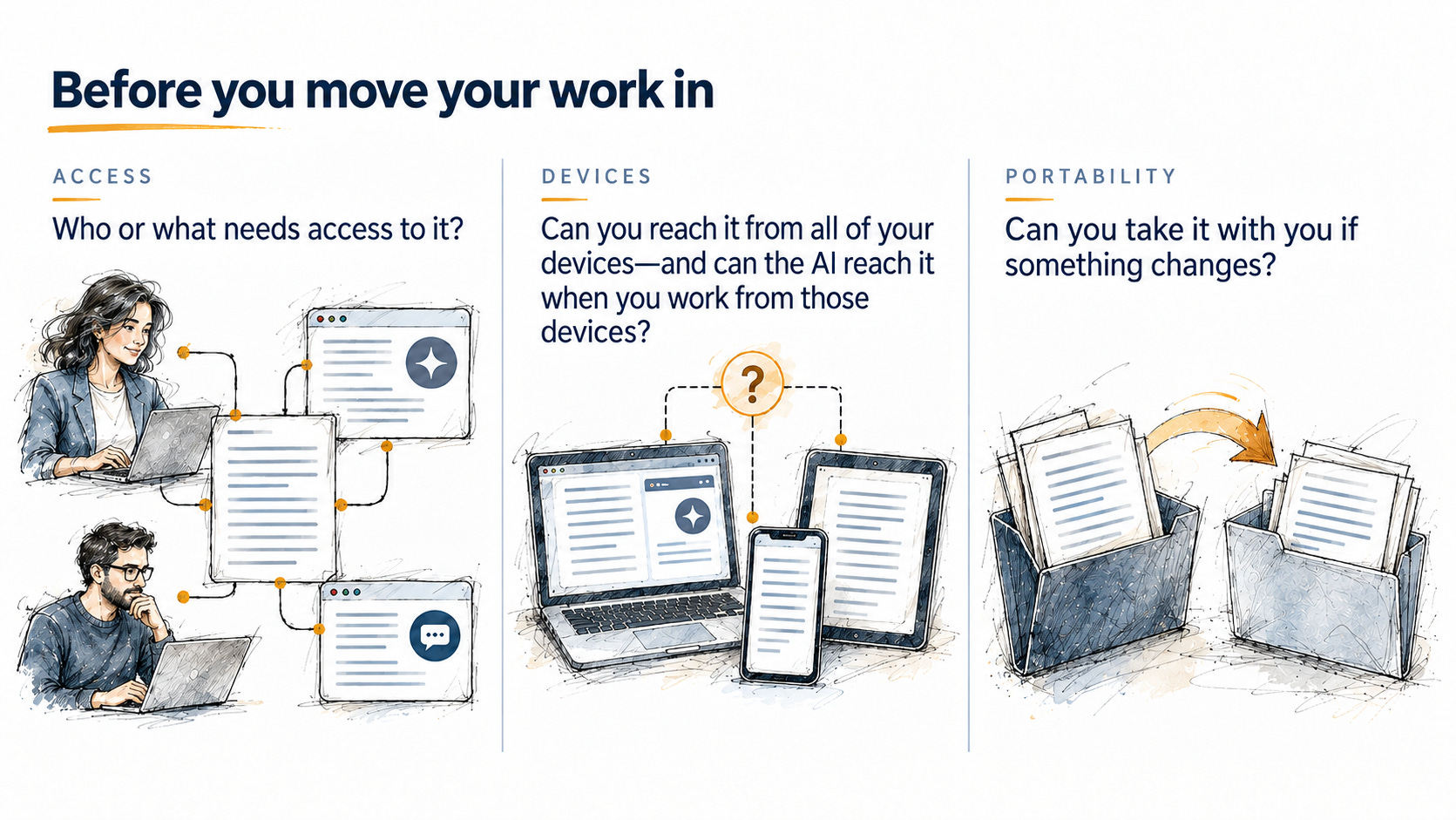
So before you move your work into an AI space or any tool space, check these three things:
Who or what needs access to it? It might be just you, you and AI, or outside sources.
Can you reach it from all of your devices—and can the AI reach it when you work from those devices?
Can you take it with you if something changes?
First, ask. Paste this into the AI before you save your work there:
Before I save my work here, tell me: Where is it stored? Can I download or export it, and in what format? Can another AI or another person use it? Can I reach it from my phone and tablet? If I use AI on those devices, can it read and update the information too?An AI isn't always right about its own features, so check its answer against the tool's help pages.
Then, test it. Put one small piece of work in, and then try to get it out. Download or export it, and open it in a different tool. From the devices you use, also check whether the AI can read and update that piece of work.
If you can't get it out, or the AI can't reach it where you need to work, you know before you move everything in.
✳︎ ✳︎ ✳︎
Where I chose to keep the work
The reason I'm keeping my work in Obsidian, a free app that reads and organizes Markdown files, is because I use more than one AI. I didn't want it locked into one space where the others didn't have access to what was going on.
I started with my hard drive, because I wanted to keep it accessible to the AIs, where I could share it easily, be it an uploaded file or whatnot. But a lot of the information I was saving needed two things: Markdown, and a way to tag and sort information.
Obsidian could read the Markdown. I could use the fields to tag and categorize things. And it's easy for AI to understand.
But it isn't so much about Obsidian. It's Obsidian with iCloud. My Obsidian folder is set up in iCloud, so it's accessible from my devices, because all of my devices have a connection to iCloud. And if I need to share a file, I can easily do that.
Realistically, it could be Obsidian with Drive, or Obsidian with Dropbox, or Obsidian with my hard drive.
Basically, it's just a file system and reader:
I have my choice of where I want to store the information.
I have a choice over who and what I share that information with.
I have a choice of how I want to structure that information.
It's not completely dictated for me.
I'm sure that I have files in the AI cloud. But by storing your work in an area that is specific to your needs, and that is portable, you avoid getting stuck.
Before you move your next piece of work into an AI's space, run the prompt and the test. Then tell me what you found. Could you get your work back out?
You don’t have to move everything at once. Start with one piece of work and see whether the setup fits how you actually use it.
✳︎ ✳︎ ✳︎
Help with your next decision
Where your work lives is one decision. If you want help working through the next one, the Decision Toolkit pairs a workbook with companion AI skills.
Get access to the Decision Toolkit, available in the perks.