

TL;DR: My email sorter worked. So did every tracking layer I added after it. None of them answered the question I actually had every morning: what needs me now, and why. The fix was not a new tool. It was pulling sorting, tracking, and attention apart into three separate jobs, then changing only the one that was mismatched.
✳︎ ✳︎ ✳︎
My best friend, who I camped with for years, lives about an hour or so from me, and there are many ways to get there: a major highway, a secondary highway or a bunch of back roads.
I always take the same highway, get off at an exit, and circle back to her house, because that's just the way that I know. Even so, the GPS goes on for the drive, mostly because there is this one road to turn on, and I always overshoot it.
Then this one time there was a really bad accident that forced a detour. Somewhere along that road the thought showed up: this is a route I need to take more often. Somewhere in the back of my mind, I probably knew it was an easier drive: less traffic, no three-lane highways, just an old-school two-lane road, the kind you took before they built major intersections. It was a much more pleasant drive.
And that's when it hit me.
Sometimes we travel the same path over and over and over again, and we forget that there are alternate or better routes.
The accident forced the different route. Nothing forced me to reconsider the email system, so the comparison only goes so far. What stayed with me was how easy it is to keep using the familiar route after a better-fitting option appears.
✳︎ ✳︎ ✳︎
Hi, I’m Lee. Welcome to DigiNav Compass Signal. Around here, I share what happens when AI and technology meet a real business—the useful parts, the messy parts, and what you can take into your own work.
Today, I’ll be showing you the decisions behind my email system, from the first sorting script to the two AIs that now split the work, and the question that stopped me from replacing a system that only needed a different job.
✳︎ ✳︎ ✳︎
The first job was sorting
My email had been on the same familiar route for a while too.
Back in March the project was a Chief of Staff dashboard: one place to pull information into, so the day could start with what needed attention instead of with a hunt for it. Email was the weak link. The dashboard could show how much was waiting. It couldn't show what kind of waiting.
A client question sat next to a plugin update notification.
Doing anything useful still meant opening Gmail and sorting through everything by hand.
Which meant checking email to figure out whether it was time to check email.
If that sounds familiar, the next part probably will too. The wish was clear: let AI handle it. What wasn't clear was what "it" was. Email felt like one big problem, and one big problem invites you to fix everything at once.
Then one line in Jenny Ouyang's piece on the levels of AI automation cut through it: "I wanted AI to read my inbox for me." That was the problem, stated plainly. Not agents making decisions. Not workflows routing data between platforms. Just sorting.
So that was the first decision. Stop treating email as one big problem, and give the first job a name:
Sorting. Tell me whether anything in Gmail deserves my attention, so I stop opening Gmail to find out.
That decision set the limit for everything that came next. This was not a Gmail rebuild. It was one question, answered.
✳︎ ✳︎ ✳︎
What would make the sorter trustworthy?
Naming the job was the easy part. The harder decision was what it would take to believe the sorter was doing it.
Anyone who has handed a task to automation knows this moment. The thing runs. The results come back. And the question underneath is not "did it work?" but "how would you know?"
The early test runs made that question impossible to skip:
Run one: every email landed in Action Items. The rules were not specific enough about what counted as noise, so the script defaulted to the safest bucket.
Tighter rules: the pendulum swung. Everything landed in Read Later.
Then the disappearing emails: the script archived before the labels fully applied, so messages ended up with no inbox and no folder.
None of that was the decision. The decision was settling, up front, on the evidence that would count. Without that, the second-guessing never ends.
The evidence was an audit trail. Every email that went through the script got tagged _Processed. When the counts didn't add up or a category felt light, that folder showed exactly what the script had done. It was the safety net I didn't know I needed: a way to refine the rules without losing anything and without going back to sorting the inbox by hand.
And even with the evidence in place, the anxiety stayed. The inbox was nearly empty, and the brain reads that as something's broken. A quick peek to see if anything got missed. Then another. The same habit the script was supposed to remove, just in a new costume.
So after a few more test runs, a look through the Processed folder confirmed the sorting was accurate, and the decision got made out loud:
Stop opening the inbox. Go to the folders. Work from there.
That sounds simple. It was the hardest part of the entire build. It was also the moment the first job counted as done: there was evidence the sorter worked, and a commitment to act like it.
✳︎ ✳︎ ✳︎
When sorting solved the wrong problem
For a while, the sorter did exactly what it was asked. The inbox stayed clean. The compulsive refreshing stopped. The first twenty minutes of the day were no longer spent sorting; they were spent deciding what to act on.
That last part is where the next decision was hiding.
One morning, coffee in hand, it was time to go through the Action folder and set the day. And a new anxiety started building. This wasn't supposed to happen anymore. The triage was dialed in, the rules were tested, and the whole thing had been written about publicly. Yet the Action folder was heavy:
a hefty WordPress migration that needed to go on the schedule
a two-minute yes-or-no for a different client
three emails that had been circled for days
a vendor follow-up promised on Tuesday
All muddled together, all the same, there was no way to tell at a glance which was the quick reply and which was going to eat several hours of the day.
And the second guessing started again. Is this actually working, or did I just move this to another mess? And underneath it all was the fear that the thing I had just told everyone was working was about to prove me wrong again.
This is the moment a lot of systems get replaced. A working tool produces a new kind of friction, and the friction gets read as failure. The easy move is to decide the sorter was wrong and go find something else.
The harder decision was to admit what was right in front of me. The sorter was doing its job. It had never been asked to do this. Sorting answers: what kind of email is this? The Action folder was asking a way different question: which of these needs me first, and how much time will it take? The question had been sitting with me the whole time. The sorter just made it visible.
Successful sorting did not solve attention. It exposed that attention was a separate job.
Admitting it was uncomfortable because that meant the system wasn't finished when I clearly said it was in the article. But it was the first time that the real gap had appeared.
✳︎ ✳︎ ✳︎
Every layer taught me something
Now that the problem was revealed, the natural move was to add something that could hold the missing context. So that is what I did, more than once. Each layer had a decision that made sense at the time, and each one taught something that the last one couldn't.
Google Tasks was the first try, because it was right there: same ecosystem, free, one click. A handful of action items went over and landed as context-free one-liners. No sender, no subject, no link back to the thread. Follow up re: site sat next to approve invoice with nothing to say which was which. They got stuck there. The lesson was quick: moving an item somewhere else does not add the context it was missing.
The Google Sheet came next, and it came out of pushing back. The first suggestions were a third-party ticket system, a separate project management app, and a form for clients to fill out. None of those fit. The email was what was working; the problem started after the email hit the Action folder, and the answer needed to live in the same place. So the Sheet got built, on purpose, with the thinking behind it rather than a generic template: who is asking, the subject, the priority, a link back to the thread, and one row per email inside a thread so nothing collapsed into a single flat line. A small script filled it in the background.
And it worked. Action items were captured with context, emails could be archived without losing the ask, and the Sheet fed straight into the morning rhythm. That was not nothing.
The Notion Attention Queue came later and made the work visible in a different way. It had views for what needed a decision, what was ready to act on, what was underway, and what was waiting. Each piece of work became a card moving through six stages from arrival to finished. It organized the work, but it was still another tracking surface.
Here is what was true about all three, and it took a while to say it plainly:
Each one worked, technically. None of them was a broken tool.
Each one added context or tracking. Each one also added a surface to maintain.
None of them answered the question from the Action folder: what needs my attention now, and why?
It only added a layer of tracking, not priorities.
This became a pretty solid system. It just wasn't the system for me. And none of it was wasted. Every layer and change showed more clearly where the gap actually was. Not in the tools, but in what they were being asked to do. I knew in my gut something was off, and now I could see the results from what was actually not working.
✳︎ ✳︎ ✳︎
The job I had never assigned
At some point, what was off was the hardest to miss. Every fix had been another layer: a task list, a Sheet, a database. Each one held more context than the last, and the question to kick it off every day remained the same. The next decision wasn't about which tool to try (should I use Sheets or Notion or something else). It was to stop adding to the process and go back to the question that had been hiding the whole time.
That is harder than it sounds, but the easy diagnosis was sitting right there. It wasn't that AI wasn't smart enough, or I was using the wrong model or the wrong tools for the follow-up. I wasn't copying other people's systems. I had tried some of those. But I was trying to build a system that wasn't based on how I actually worked. When I first started building this, it wasn't about the productivity of making sure that everyone's needs were addressed and tasks were completed. It was about how it fit into my day and my energy levels throughout the day.
The honest version was less flattering.
AI was not the problem. The problem was how I defined the process.
Back in March, the job had been defined as sorting. The email triage was all about sorting. And every layer that was added after that was about tracking, but tracking and sorting are two different issues. What was never really addressed was my attention. What got addressed right away, or what got kicked down the road because I didn't have the focus to deal with it in that moment, and that's when things started to get lost. So the redefinition came down to pulling the three jobs apart:
Sorting: what kind of email is this? Repeatable. Runs in the background.
Tracking: what does this piece need from me? Where does it stand? It is a record, not a verdict.
Attention: what needs me now, and why? A judgment call made with context each time.
The first two were already working, but the third had never been addressed. It had been expected to fall out of the other two, and quite frankly, it never did. That is why the system never quite worked. And that is why the gut check is so important.
If you are in the same back and forth, where the system works but something is off, here is one thing you can ask AI before you swap anything out. Paste it into whatever AI you already use and answer its questions honestly:
I have a system that works technically but does not feel right. Before I replace it, help me figure out what job I am actually asking it to do. Ask me what the system does now, what decision I still end up making by hand every day, and what I am expecting it to do that I never told it to do. Then tell me whether I have one job here or several jobs I have been treating as one. Do not recommend a new tool yet.✳︎ ✳︎ ✳︎
Keep what works. Split the jobs.
Once the three jobs were pulled apart, the rebuild was small. Nothing got thrown out. The decision was to keep what had already proven itself and make each job's boundary clear, instead of asking one setup to do all three.
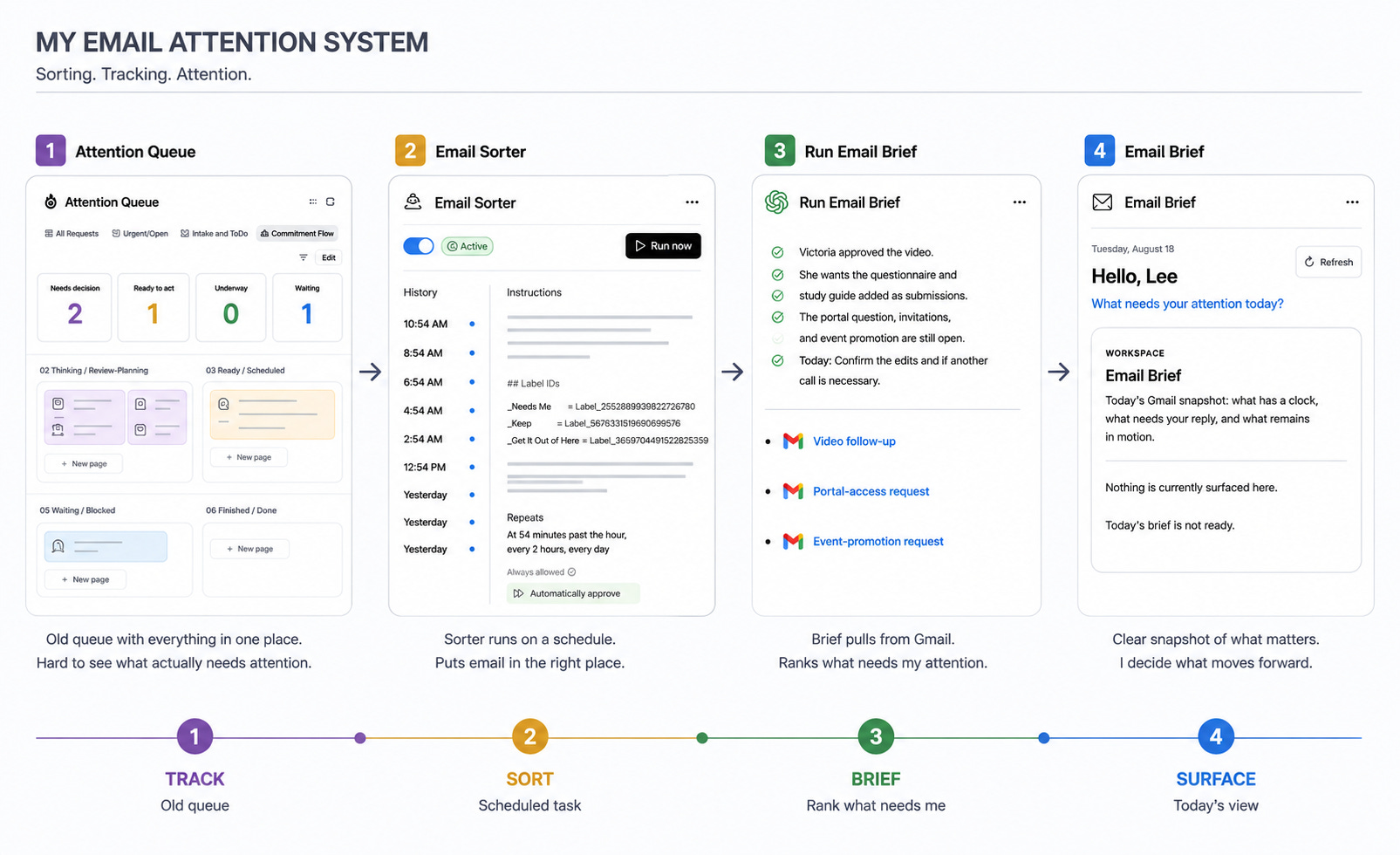
The sorting job stayed where it was working. The tested steps from the March build came forward: sort on a schedule, use a few clear labels, and keep the inbox out of it. Today that job belongs to a scheduled Claude task. It runs every two hours, every day, and it sorts into three labels: _Needs Me, _Keep, and _Get It Out of Here. It is the repeatable background job, and it does not need me in the room.
The attention job got its own surface. This is the piece that had never been assigned. It now lives in a dedicated ChatGPT Work task, the Email Brief. When I ask it to run, it reads the permitted Gmail locations, including Claude's three labels, checks the full thread and my Sent mail, and comes back with up to five things that need me, why each one matters, when to respond, and a direct link to the thread. It does not re-sort. It does not touch Gmail. It reads, ranks, and explains, and then we talk about it.
Tracking stayed inside the brief as state: New, Changed, or Carried forward. It records what remains without pretending to decide priority on its own.
This part came from an outside example. Peter Yang's email process starts with a dedicated Chief of Staff thread, a single ongoing conversation that takes the place of opening Gmail. I took that one piece. Not his reply workflow, not his calendar steps, just the idea that attention is a conversation, not a list. It helped me see what my system was missing, and I adapted it to my own boundaries.
A few things worth being clear about, because this is where people tend to draw the wrong conclusion:
This is not a model verdict. Either tool could do more than one of these jobs. I pay for both, so I am using each where it fits the job and how I work.
Adding a second AI was not the breakthrough. Separating two jobs that had been treated as one was. The second AI is just who got the second job.
The old work is all still in here. The labels, the schedule, the pushback on tools that pulled me out of Workspace. I pulled the best, tested process steps and improved on those.
What this looks like on a normal morning: the sorting has already happened. I open one pinned conversation, give a quick update on what I have already tackled since last time, and ask it to update the brief. Back comes a short, ranked response that divides attention into three sections:
important emails and follow-ups
subscriptions I need to review
suggested filters
That covers the deadline-driven actions and responses I need to take, and it also surfaces the items that are getting in the way. It is the answer the Action folder could never give on its own.
What needs my attention now, and why.
✳︎ ✳︎ ✳︎
Review the system you already have
None of this needed a new platform. It needed a better look at the decisions that were already made, in the order they were made. If you have a system that works on paper and still leaves you with that morning feeling, the same review is available to you. It is not a rebuild. It is a walk back through your own decisions:
What job did you give it? Say the first job out loud, the way it was defined when you built it. Mine was sorting. Yours might be capture, or scheduling, or follow-up.
What evidence told you it was working? Not a feeling. The thing you checked. If you never decided what would count, that is where the second-guessing comes from.
What decision still lands on you every day? That is the job the system was never given. For me it was attention: what needs me now and why.
Which parts already earned their keep? Those stay. The labels, the schedule, the pushback that kept things inside the tools you already use. None of that is waste.
Which single job is mismatched? Change that one. Give it its own owner, its own surface, its own question. Leave the rest alone.
That last step is what the detour taught me. The highway was never wrong. It just wasn't the only route, and I had stopped checking. The same was true of the inbox.
If you want a place to start, paste this into the AI you already use:
Walk me through a review of one system I already run. Ask me, one at a time: what job I originally gave it, what evidence shows it is doing that job, what decision I still make by hand every day, and which parts have earned their keep. Then name the one job that is mismatched and suggest the smallest change that gives that job its own owner. Keep everything else as it is.Before you replace it, find out what you actually asked it to do