


I’ve always been directionally challenged. Map reading stressed me out. My husband used to tease that I could follow step-by-step instructions and still end up lost.
So when I downloaded Waze for the first time, I knew it would be my game-changer. Plug in the destination, follow the instructions. Simple.
Except when traveling routes I kind of knew.
Because “How do I get there fastest?” isn’t the same question as “What’s the best way for how I want to travel?”
The thing is, following the optimal path always felt wrong. It took away my “what if” moments. What if we turn down this side street? What if we stop at that interesting store? What if we take this side road that cuts traffic because I’ve driven it a hundred times?
The GPS didn’t factor in the shortcuts I already knew. It just gave me the statistically efficient route. And following it felt hollow like something essential got left behind.
I didn’t realize I was about to experience the exact same tension in my work.
Last week, I activated Claude’s newest feature: Skills. Perfect on paper. But for what I actually needed to accomplish? It didn’t land. The prescribed approach felt like I was forcing something that wasn’t built for my specific context.
So I started asking questions, lots of questions.
Not because Skills was wrong. Because I needed to understand the who, what, and why of what it was suggesting.
That curiosity changed everything.
Optimal Features Aren’t Always Optimal
Here’s what most people think when they encounter optimization features: “The system knows what’s best. I should follow it exactly. Deviating means I’m doing it wrong.”
It’s a reasonable assumption. Optimization sounds scientific. Authoritative. Like, there’s one right answer baked into the algorithm.
But here’s what I discovered: optimization assumes the “best route” is universal. It’s not.
The best route depends on what you already know, what you’re willing to explore, and what you’re actually trying to accomplish. When you follow a prescribed path without asking, “Does this fit my actual situation?” you’re not being efficient. You’re operating with blinders.
Which means the smarter move isn’t to follow optimization—it’s to question it.
Here’s what this costs you if you don’t:
You implement solutions that work on paper but feel misaligned with your actual workflow
You spend time forcing “best practices” into systems they weren’t designed for
You lose the strategic shortcuts you’ve already discovered through experience
You mistake following instructions for progress
The GPS gives me the fastest route based on traffic data. It doesn’t know I’ve driven these roads for years, and there’s a neighborhood shortcut that saves five minutes and avoids an intersection I hate. It’s optimizing for speed. I’m optimizing for how I want to travel.
When I activated Claude’s Skills, the same pattern emerged. The framework was solid. But my project needed a “side road” the Skill hadn’t accounted for—a nuance that shifted everything.
I could have forced it. Most people do.
Instead, I asked the nagging questions. The ones that felt like they might slow me down but kept surfacing anyway.
Those questions didn’t derail the process. They refined it.
Working Fine Is Not Working Fine
When I first started using Claude, I approached it like a GPS. Here’s my destination, show me the optimal path, and I’ll follow it.
That worked fine for simple tasks: basic writing, quick research, and straightforward questions.
But when I started building more complex workflows—specifically, automating my content creation process—I ran into a wall.
I realized I was manually copying and pasting refined stories from Claude into Notion. Each piece: headline, refined story, components. All separated, all requiring me to bounce between apps.
It didn’t take hours. But it took energy. That momentum-killing friction of flipping screens, losing focus, copying from here, pasting there, back and forth.
So I thought: I’ll just build a Skill. That’s the whole point of Skills—automate these repetitive things.
I started building it. And immediately hit confusion.
My process wasn’t linear. I had multiple Notion databases working together. So my first real question was: “How does it know which database to put this in?”
That’s when I realized the Skill was optimizing for a generic workflow. But my workflow had layers. Context that the prescribed solution hadn’t accounted for.
I could have scrapped it. Could have said “This doesn’t work for me” and gone back to manual copy-paste.
Instead, I got curious about the question itself.
I asked Claude: Why are you suggesting this approach? ” What if I have different databases? What if I need the instructions to account for this specific context?
We started recalculating.
The first attempts didn’t work. One day it would function perfectly. Next day, nothing. I kept hitting walls and I kept going down the wrong roads.
Watch me walk through the exact moment I realized the prescribed Skills approach wasn’t built for my workflow, and how asking clarifying questions led me to embed automation directly into my Claude project instructions instead.
But then something shifted.
I stopped asking “How do I make this work?” and started asking “What’s the actual problem I’m trying to solve?”
The actual problem wasn’t “automate this workflow.” It was “eliminate the friction of bouncing between apps while keeping the flexibility of my specific process.”
That’s different.
So instead of building a standalone Skill, I went back to Claude with everything I knew about my actual process. I gave it the full picture: Here’s my database structure. Here’s what I need extracted. Here’s where it goes. Here’s the specific format I want. Here’s the friction point I’m trying to eliminate.
Then I asked Claude directly: “Based on my actual workflow, how should I build this automation into my project instructions? What’s the simplest, most reliable way to structure this so it works every time?”
That question changed everything.
Claude walked me through exactly how to embed the automation. Instead of me guessing at the right syntax or structure, Claude recommended the specific approach that would work for my situation. It showed me where the trigger point should be, how to format the extraction logic, and what the verification step should look like.
The moment I implemented Claude’s recommendation, everything clicked.
Now, when I finish refining a story, I paste the title. Hit enter. The system extracts every component, formats it exactly as I need, saves it to Notion, and gives me a verification link.
No more bouncing between apps. No more copy-paste friction. Just intention meets automation.
Tools That Actually Work
Why Following Prescribed Optimization Was Costing Me
I was spending a few minutes per piece manually transferring content between apps. Seems small. But across my workflow, it meant losing focus repeatedly, context-switching energy drain, and the friction that makes you less likely to refine stories in the first place.
Real consequence: I was avoiding the full process because the back-end felt tedious.
Here’s What Changed: Context-Specific Instructions Over Generic Solutions
Instead of building a universal Skill, I embedded the automation into my specific Claude project, providing detailed context for my actual workflow.
Here’s exactly how to adapt this for your situation:
Step 1: Map Your Actual Process (10 minutes)
Don’t describe what you think your process should be. Document what you actually do:
What’s the starting trigger? (For me: refined story)
What happens in between? (Extraction, formatting)
What’s the endpoint? (Notion database)
Where do you currently lose energy bouncing between tools?
Write this down. Be specific about friction points.
Step 2: Identify Your Clarifying Question (5 minutes)
There’s usually one detail that shifts everything. For me, it was the multiple databases that were part of the process.
Ask yourself: What’s the one piece of information that would make this system know what to do without me explaining it every time?
That’s your clarifying question. Build it into your process.
Step 3: Give Claude Your Full Context (10 minutes)
Instead of: “Automate this”
Say: “Here’s my current process: [detail]. Here’s the friction point: [specific problem]. Here’s what I need the output to look like: [exact format]. Here’s my clarifying question: [the detail that triggers everything].”Step 4: Let Claude Recommend How to Build It (5 minutes)
Paste this into Claude:
I need to automate this workflow into my Claude project instructions. Here’s the full context:

[Your process map from Step 1] [Your friction point] [Your desired output] [Your clarifying question] [Your destination system]

Based on my actual workflow, how should I structure this automation in my project instructions? What’s the most reliable way to embed this so it works consistently? Show me the specific approach you’d recommend.
Claude will recommend the exact structure that fits your situation. Not a generic template. The actual approach that works for your specific workflow.
The Result
You stop guessing at how to build automation. You let Claude analyze your specific situation and recommend the approach that actually works for you.
Most people either try to force generic solutions or spend weeks building custom ones. This 30-minute process saves you that friction by letting Claude recommend the right approach upfront.
SECTION 5: CLIENT REALITY CHECK (290 words)
When clients come to me frustrated with Claude or other AI tools, the conversation usually goes like this:
Them: “This feature is supposed to save me time, but I hate it. Everything feels off.”
Me: “That’s not a flaw in the tool. That’s your gut telling you it wasn’t built for your specific situation.”
Them: [Long pause] “So I’m not doing it wrong?”
Me: “No. You need to define the process to your needs and match the tool to it.”
That pause is everything.
Most prescribed solutions optimize for efficiency in general. They don’t account for the specific context that makes your workflow yours.
One client was using a template-based content system that technically worked—it saved time. But she hated using it. Everything felt generic. The output was fast but hollow.
When I asked her, “What would make this feel like your voice instead of the system’s voice?” she realized the template was stripping out the personality. The specific details that made her advice different from everyone else’s.
We didn’t need a better template. We needed instructions that preserved her specificity while automating the busywork.
Here’s the universal principle:
Permission to explore and question isn’t inefficiency. It’s strategic refinement.
When something feels off, it usually means the prescribed path doesn’t match your actual situation. That’s not a weakness. That’s strategic awareness.
The businesses I see winning aren’t the ones that blindly follow the suggestions. They’re the ones who ask: “Does this work for how I actually operate? If not, what needs to change?”
That questioning isn’t slow. It’s what makes automation actually work.
Most people try to force the generic solution first. Then they give up when it doesn’t fit. What works is asking the clarifying questions early—the ones that feel like they might complicate things but actually make everything simpler.
Your caution about following a prescribed path? That’s not overthinking.
That’s exactly the strategic thinking that separates working automation from frustrating solutions.
The Smarter Strategic Approach
The Old Way: Activate a feature or framework, hope it fits your specific situation, force it when it doesn’t.
The Smarter Way: Use Claude to map your actual workflow, identify friction points, and build instructions that account for your specific context.
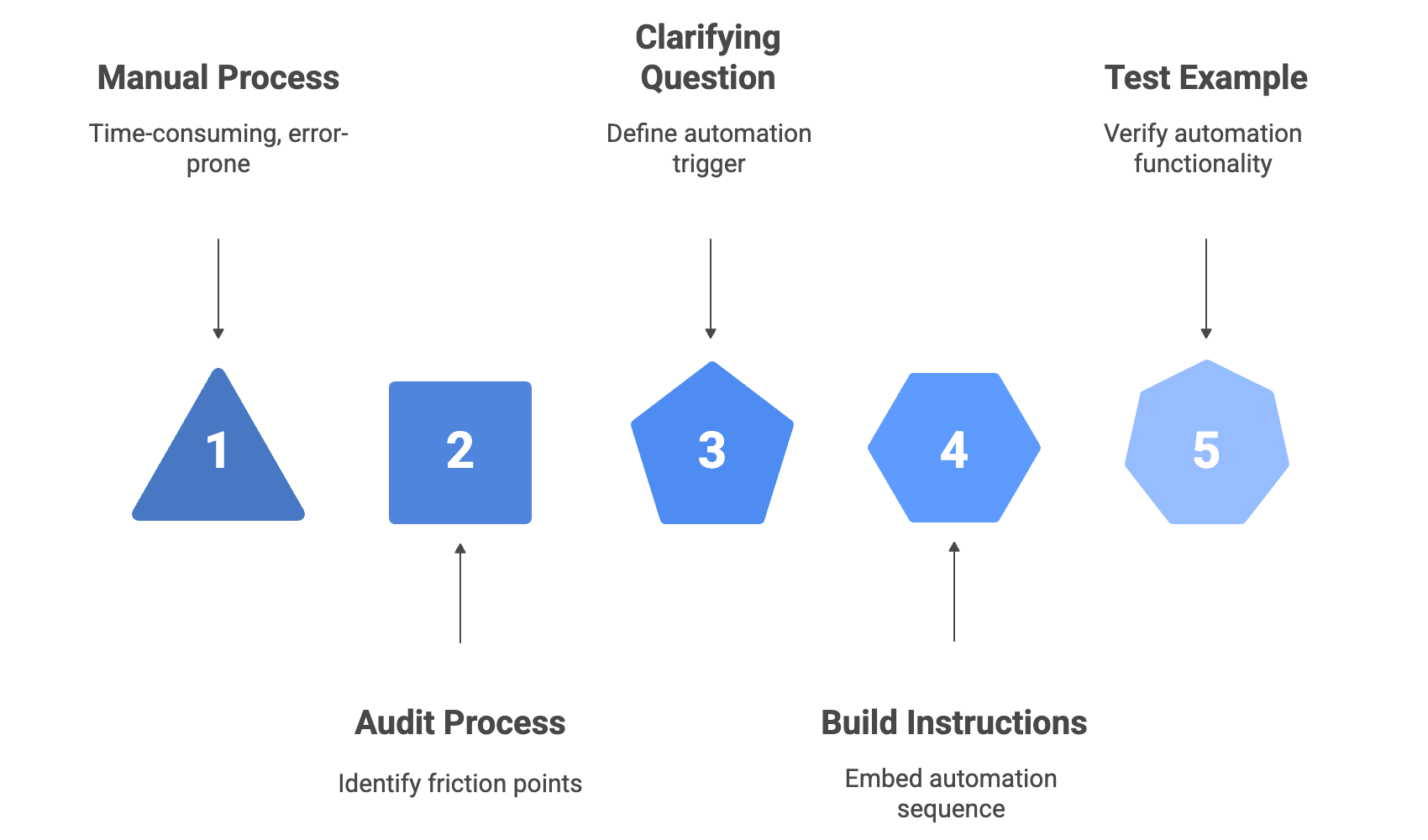
Here’s exactly how:
Step 1: Audit Your Current Process (10 minutes)
In your Claude project or thread, paste this:
I’m trying to automate [specific task]. Right now, here’s how I do it manually:
1. [Starting point]
2. [Middle steps]
3. [End point]
The part that takes the most energy is: [specific friction point]
What I need the output to look like: [exact format/destination]
Step 2: Ask Claude to Identify Your Clarifying Question (5 minutes)
What’s the single piece of information I could provide that would tell the system how to route/handle this automatically? What’s my “story title” moment—the trigger that makes everything else clear?
Claude will help you surface this. It’s often simpler than you think.
Step 3: Build Your Instructions (10 minutes)
Instead of relying on a pre-built feature, embed this directly into your Claude project instructions:
When the user provides [clarifying question], follow this sequence:
Extract [these components]
Format as [specific format]
Route to [specific location]
Return [verification link/confirmation]
Step 4: Test With One Real Example (5 minutes)
Don’t build the whole system first. Test it with one actual piece of work.
Use your clarifying question trigger. See if it works. Adjust if needed.
The Result
You stop trying to force generic solutions into specific situations. You build automation that actually matches how you work—not how you think you should work.
Most people waste weeks trying to make prescribed frameworks fit. This 30-minute process removes that friction by starting with your reality, not an idealized version.
Permission To Explore
Permission to explore isn’t inefficiency. It’s strategic curiosity.
It’s knowing when to follow the prescribed path and when to trust that the questions surfacing—the ones that feel like they might slow you down—are actually pointing toward something more refined.
The GPS still gets me where I need to go. But I don’t always follow it exactly. That’s not stubbornness. That’s strategy.
The same applies to AI tools, frameworks, and features. The ones that work aren’t the ones you follow blindly. They’re the ones you questioned enough to make fit your actual situation.
This entire process—from realizing prescribed optimization doesn’t fit, to building context-specific instructions that actually work—is exactly what I’m building into the SHIFT Your Context Workshop. It’s designed to help you create the documents and context that make AI work smarter for you because the gap between needing help and getting the right-sized help is smaller than you think.
This is so great, Lee,
I love how you're approaching AI differently - going deeper, asking different questions. It's such an iterative process.
I'm still haven't implemented my first Claude skill - I'm making time for it this week!