

Growing up, you stood up, walked to the TV, turned it on, sat back down, and watched.
That was the whole thing.
Now you have to figure out which remote actually turns the TV on, which one gets you to the right channel or input, and (if you’re in my house) which one runs the sound bar. Three remotes to do one thing: watch something.
I know which remote is which just by the look and the shape of it. That doesn’t stop me from grabbing the wrong one. Constantly.
I mean, if it were up to me you wouldn’t need a remote at all, because the TV would never be on. But that’s not the reality of the house I live in.
Which is why universal remotes exist. Not because I need to understand how they are all wired together in this one remote. I just want to press one button and have it work like it should.
The same thing had been happening with some of the AI processes I was building.
Start the research in ChatGPT. Create the images in Midjourney. Edit and revamp in Claude.
Every one of those is the right tool for that job. I picked them on purpose. But you end up with pieces of the process here, there, and everywhere.
And the friction isn’t that I’m using too many AI tools. It’s that I have to remember where each piece lives and which one I’m supposed to reach for next. Same as the remote basket. I know exactly which one is which, and I’m still standing there holding the wrong one.
Hi, I’m Lee. Welcome to DigiNav Compass Signal. Around here, I share what happens when AI and technology meet a real business—the useful parts, the messy parts, and what you can take into your own work.
Today, I’ll be showing you what happened when I tried to move one daily process out of a single AI and into a shared folder that Claude, ChatGPT, or Codex could all work from, what broke along the way before it worked, and what it might help you notice about the processes you’ve been quietly rebuilding in more than one place.
The short version: the process now lives in one folder instead of inside any one AI. I change the instructions in one place, and whichever AI I open that morning reads the change. The finished work lands in that same folder, so my dashboard always knows where to look.
I asked for one shared folder and got two AI skills to maintain
The one that “broke the camel’s back” happened in Prepare My Day.
It’s my morning process. What am I actually moving forward today, what needs tending, what happens if there’s room. I wanted to take it out of one AI’s skills and put it into a working folder that Claude, ChatGPT, Codex, or whatever I’m using next could all work from. I said that in the request. Shared by both, or any other AI.
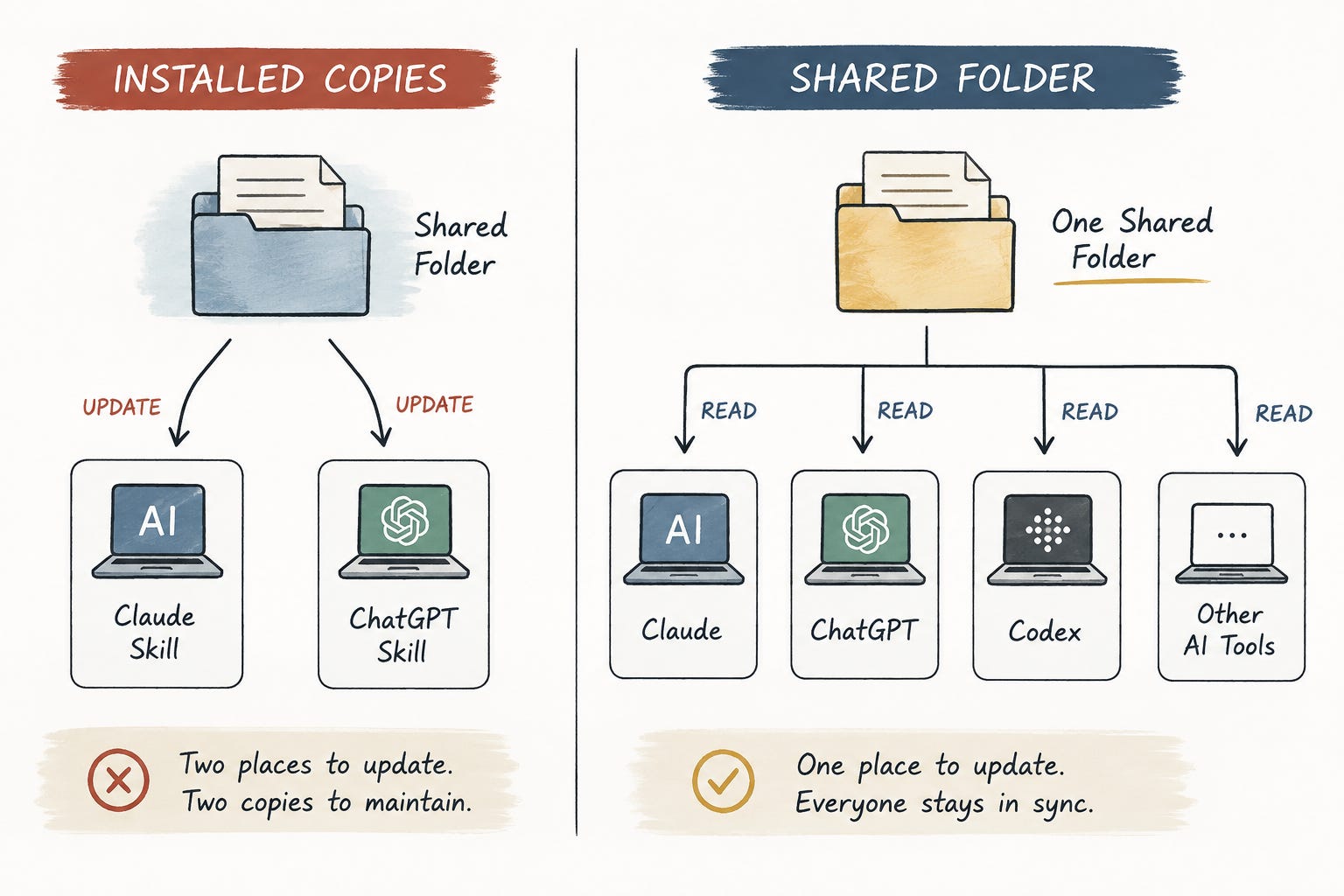
What came back was anything but what I asked for. A folder in Obsidian that held the master copy of the process but it added two more steps:
Save a packaged copy as a skill in Claude.
Upload another copy as a skill in ChatGPT.
And from there on: edit the folder, then refresh both installed copies whenever a change matters.
This is not my original ask. I dont understand.
That’s what I typed back. Exactly that, typo and all.
To which I got an explanation wrapped in a recipe analogy. The Obsidian folder is the master recipe. Claude and ChatGPT can’t read the folder on their own so they each need their own directions on their own page. Two one-time setup steps, one per app. Like having two separate recipes in the box. But the ingredients don’t change.
It was a good explanation. Clear in understanding but not exactly what I asked for.
I still don’t understand. I specifically said I don’t want it as a skill that’s installed in each AI because it needs to be AI agnostic, and you’re telling me to save it as a skill.
Because then I have two skills that I have to keep updated if I make any changes.
That was the actual objection. Not the explanation. The arrangement.
And I already had the model I meant sitting right there. Content Lab works from a folder. The WPSS article writing works from a folder. The mentors and the advisors work from a folder. I open the folder, the AI reads what’s in it, and when I change something, I change it once.
I wasn’t confused about how to maintain the copies. I was asking not to have copies to maintain.
Sharing the instructions wasn’t enough. The results needed one place too
So I took the folder to Codex and asked a simpler question. Is this actually set up to work for another model?
Not quite. Everything in the folder was usable. It was just still built to be installed, which was the exact thing I was trying to get rid of. Take that off, don’t put copies anywhere, and the folder becomes the thing every AI works from.
So I typed back three words. fix it please
And that was that. The folder finally became the thing I asked for the first time. One set of instructions, one place to change them, nothing to install anywhere.
Here’s what I hadn’t thought about at all.
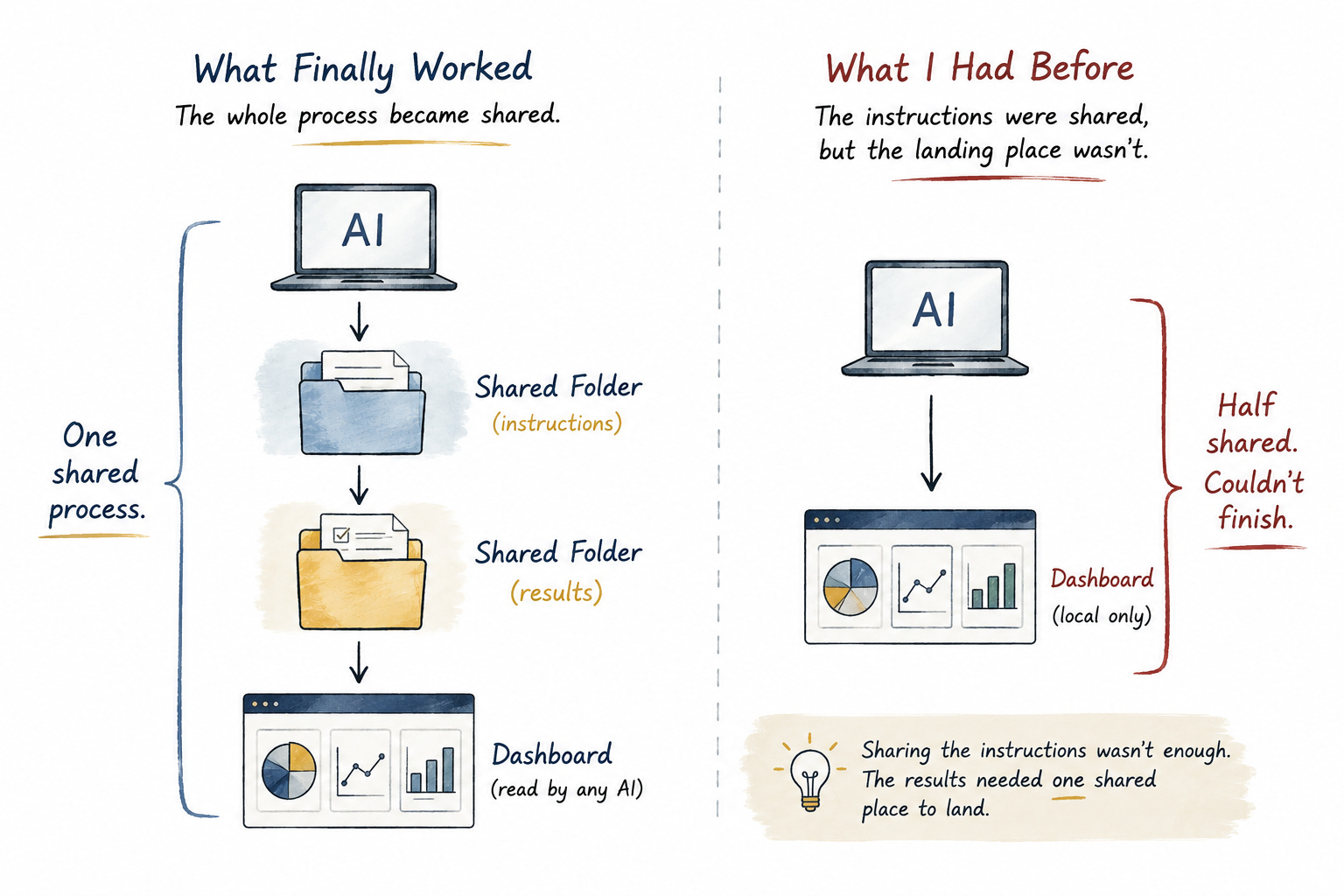
Prepare My Day has two halves. The first half is the instructions. How to look at the week, what to weigh, how to land on what actually matters today. The second half is where the answer goes. Every morning that process ends by putting three cards on my Personal Dashboard, a small thing running on my Mac. What I’m moving forward. What needs tending. What happens if there’s room.
I had spent all of this energy on the first half. I never once thought about the second half as part of the thing being shared. It was just where the work ended up.
Then one morning the cards were still sitting on August 4 and it was August 5.
Moving off the skill had broken a small piece of the dashboard. It was reading from the wrong thing. Between me and Codex we found two problems. The local server was down, which explained one of them, and there was a small glitch in the call, which for AI is an easy fix. There was only one place to go looking for either of them, which I didn’t appreciate at the time. Both got sorted. The day got published and I could see the three cards again.
Fine. Done. That’s what I thought.
Then it happened again the next morning.
And this time what came back were two ways to finish it myself. Open Chrome on my Mac and say retry. Or copy a line of code into Terminal and run it.
I’ll paste something into Terminal if I have to. That isn’t the point. The point is that to make it work it needed more manual input steps. Something waiting for me every morning.
The dashboard lives on my Mac at an address only my Mac can reach. A model working in the cloud can read a shared folder just fine. It cannot reach into my machine and set something down there.
Which meant the second half had never been shared at all. It only ever worked because I was sitting at the machine where it lands.
I had shared the instructions. I missed giving the finished work the right place to land.
What an AI-agnostic workflow actually needs
Here’s where my thinking actually changed.
This was never about wanting one AI to do everything. It was about one process. Prepare My Day. I wanted to run it in whichever AI I happened to be sitting in that morning.
Right now it’s Claude. But next week it may be Codex. Next year it might be something that doesn’t exist yet.
The answer was not to give them all their own copies. The answer to the real problem was simplicity and cohesion. Not let’s match copies every time there is a change or adjustment. Because now I have to figure out where are all the places to make those changes. Instead it’s about one place, a single source of truth so that each AI is not quietly doing their own thing.
The two things that have to be shared
What I actually wanted was smaller than that:
One live place for the instructions. I change them once, and whatever I open that morning reads the change.
One shared place for the result to land. Whichever AI ran it, the answer goes to the same spot, and my dashboard knows where to look.
That’s the whole ask.
The tools stay different. That’s fine, and that was never the part I was trying to fix. The part I was trying to fix is that there’s one process, and whichever tool I pick should just be able to run it. Picking a different one shouldn’t mean installing something, setting something up, or keeping another copy current.
Finding the glitch in the second part was the icing on the cake. Sure it broke with the first (and second) run but it would have been harder to diagnose and fix if each AI had its own skill.
What the shared folder changed, and what still isn’t automatic
Here’s what my morning looks like now.
I open whichever AI I’m working in. I say prepare my day. It reads the process out of the folder, we go through it, and when I approve the three things, it writes them down in that same folder. The dashboard picks them up on its own. I don’t open Chrome. I don’t paste anything into Terminal. Nothing is waiting for me.
That’s the whole difference.
It took me a minute to believe it, though.
I wasn’t satisfied with taking “it’s working” for the final answer. You need to test, and a few times. Mine was several tests over different checkpoints including running from the cloud instead of the desktop. Then reviewing the actual dashboard to see three cards sitting there on my screen.
Because that was the ultimate pass/fail. Three cards, no blanks.
It’s not an automatic process though. It still needs me to kick it off. But now I choose my AI of choice, connect to the folder and say “prepare my day”. And this was the goal. One process, any AI with the same results.
The prompt to check your own workflow
And now it’s a simple ask for any other process I want to run the same way. Here it is, if you want to point it at yours.
Look at how this workflow is set up. If I change the instructions in one place, will every AI use the updated version, or will I have to update it somewhere else too? Also check where each AI saves the result. Explain anything that is being duplicated and suggest the simplest way for every AI to work from the same folder. Don't change anything until I approve it.Back to one button: what happens when the tools change
This is one process that I took from scattered to streamlined and I have many others still.
The goal is to take advantage of whichever tech or AI is my tool of choice. Prepare My Day no longer belongs to any one AI. It isn’t sitting inside Claude, or inside Codex. It lives in a folder, and whichever one I open that morning goes and reads it.
Which brings me back to the remotes, because that was the problem I wanted to solve. Not fewer devices. The television, the sound bar, and whatever is back there are all still doing their own separate jobs. I just wanted to press one button and have it work like it should.
Because at the end of the day tech changes. AIs are advancing. The options are increasing. And it’s not which should I choose that is the key decision, but will it break what I have.
And this exercise is where you know something isn’t working, but you can’t quite put your finger on it. For me it was why can’t I use ChatGPT instead of Claude to make this work. For you it may be something else.