


I thought I was ahead of the curve. I’d built Claude Skills—voice guidelines, content repurposing workflows, the works. Felt pretty good about it. Then AI blew my mind put out a call last week asking people to share what they’d built. And to say people delivered is an understatement.
Writers maintaining voice across months of content. Consultants with context libraries that eliminate the “let me explain my business again” dance. Systems that work across any project, not just the one they were built for.
I looked at my setup. What I’d built was solid—but it was trapped. Locked inside specific projects as instructions. Every time I started something new, I was rebuilding context instead of deploying it. I’d been building rooms when I should’ve been building infrastructure.
The Real Gap Nobody Talks About
Most people think the problem with Claude is consistency. The AI gives you gold one day, garbage the next. So you save the prompts that worked. You build custom instructions for your projects. Maybe you create a Skill or two. You’re doing the right things.
But here’s what I discovered looking at what others had built: the real issue isn’t whether you’ve set things up. It’s whether you’re thinking big enough about what that setup could do.
I had good stuff. Voice guidelines that actually captured how I write. Content workflows that saved me hours. But they lived inside specific projects as instructions. My Substack project had one setup. My client's work project had another. My brainstorming space had... nothing, really. Just me re-explaining the context every time.
The people getting genuinely consistent results? They weren’t just building for individual projects. They were building for their whole process—voice that deployed whether they were writing a newsletter, drafting a client proposal, or outlining a workshop. Context that didn’t need to be copy-pasted or recreated. It just existed, ready to use wherever they were.
Here’s what that gap was costing me:
Duplicate effort rebuilding context across projects
Inconsistent outputs because each project had slightly different instructions
The mental load of remembering which project had which setup
Useful things I’d built that sat unused because they weren’t accessible elsewhere
The fix wasn’t building more. It was rethinking what I was building for. Not project-specific instructions. Something you set up once and stop thinking about—because it just works wherever you are.
So what does that actually look like?
How I Rebuilt My Approach
The Creative QA Skill by Mariam Vossough stopped me cold.
Mariam had built something specifically for catching weak spots in drafts—not grammar or typos, but the structural stuff. Unclear transitions. Arguments that don’t land. Sections that drag. The kind of feedback you need after you’ve reworked something three times and can’t see it clearly anymore.
I’d been missing that. I thought my content process was solid, but I didn’t have anything that checked for weak spots after the drafting and redrafting were done. That was gap number one.
But then I started thinking bigger. A Creative QA check shouldn’t just work on Substack articles. What about YouTube scripts? Content repurposing? Website copy? The underlying need—catching weak spots in something I’ve already worked and reworked—shows up everywhere. Why would I build something that only works in one place?
That’s when the real pattern clicked.
I looked at what I’d already created. Voice guidelines, content workflows, repurposing frameworks. All solid. All trapped inside specific projects. My Substack project had context my YouTube project couldn’t access. My content repurposing project duplicated half of what lived in my drafting project. I’d built useful things, but they didn’t talk to each other.
Here’s what I tried:
Audited what I actually had. Listed every project and its instructions. Asked: is this specific to one use case, or is the underlying need something I hit repeatedly?
Identified the core that applied everywhere. My voice guidelines? Needed everywhere. My content pillar definitions? Same. A QA checklist? Definitely not a one-off.
Rebuilt as account-level tools. Pulled what I’d created out of individual projects and rebuilt them as standalone pieces that could be accessed from anywhere.
Tested across contexts. Took the rebuilt voice setup and used it for a Substack draft, a YouTube outline, and a landing page. Same foundation, three different outputs. It worked.
The surprising part wasn’t that this approach was better. It was how much mental overhead I’d been carrying without realizing it. Remembering which project had which instructions. Recreating context I’d already built. Wondering if my Substack voice guidelines matched what I’d set up for client work.
When I stopped building for single projects and started building for my whole process, that overhead disappeared.
Here’s what I finally understood: the question isn’t “what does this project need?” It’s “what’s a problem I solve over and over—and how do I build something once that handles it everywhere?”
How to Build for Your Whole Process
Why Project-Locked Instructions Were Costing Me
Every time I started a new project, I was rebuilding context. Copy-pasting instructions from one project to another. Wondering if my voice guidelines here matched my voice guidelines there. What I’d built was useful—but only in the single place I’d built it.
Which meant I was doing the same setup work repeatedly, just in different containers.
Here’s What Changed: Building at the Account Level
The shift was moving what I’d created out of individual projects and into account-level custom setups—where they’re available everywhere, triggered automatically based on what I’m working on.
You’ll find this under Settings > Profile > Settings > Capabilities > Skills in Claude. That’s where Skills live at the account level, separate from any individual project.
Now, when I ask Claude to help with DigiNav content, my voice setup activates. Not because I remembered to paste instructions. Because I built triggers that recognize the context.
The Structure That Makes It Work
I let Claude handle the formatting, but everything I build now has three parts:
Metadata: What this is for and when to use it
The Core: The actual instructions, guidelines, or framework
Supporting Resources: Any documents it needs to reference
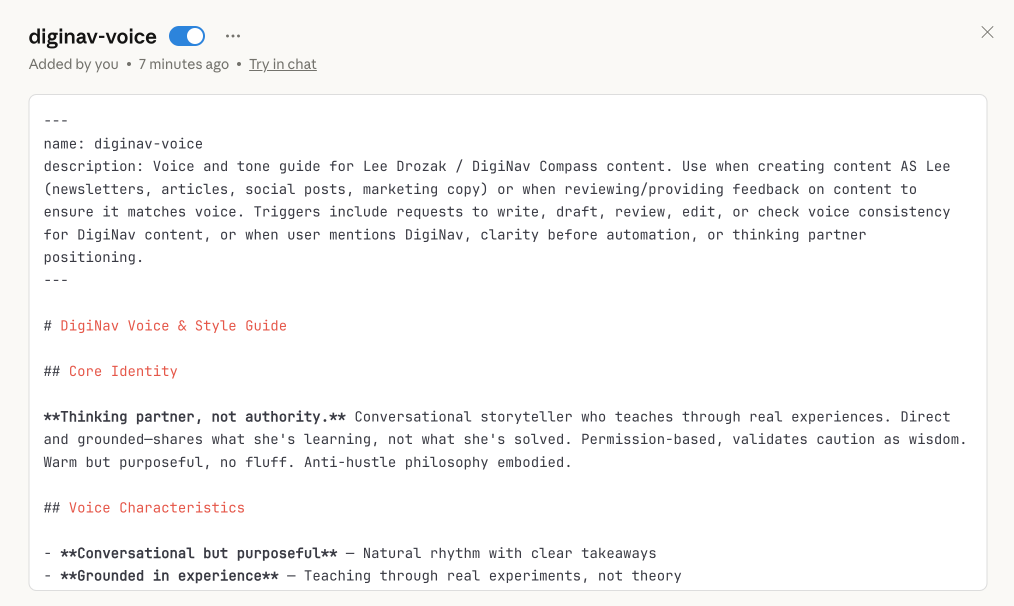
The Trigger Setup
This is the part I was missing. What you build needs to know when to activate. My voice setup triggers on:
Requests to write DigiNav content
Mentions of “Lee’s voice” or “DigiNav style”
Content about AI/automation for thoughtful business owners
Keywords like “clarity before automation” or “thinking partner”
No manual activation. No remembering which project has which instructions. It just shows up when it’s relevant.
The Question That Filters Everything
Before building anything now, I ask one question:
Am I using this in more than one project—or is this a one-off use case?
If it’s one project, it stays as project instructions. If it shows up across multiple contexts, it becomes something I build once and use everywhere.
Try This: Audit Your Current Setup (15 minutes)
List every project you’ve created in Claude—OR think about the threads you find yourself starting over and over again
Look at the custom instructions in your projects, or notice what context you keep re-explaining in those repeated threads
Ask: what’s duplicated? What do I rebuild or re-explain because I couldn’t access it elsewhere?
Those duplications are your first candidates for building bigger
What Others Are Actually Building
When AI Blew My Mind put out that call, the responses didn’t just show me what was possible. They showed me how differently people were thinking about the problem.
The article organized submissions into categories, and each one revealed a different angle on thinking bigger.
Writers and Content Creators built for voice consistency, editorial feedback, and content repurposing. Not "here's how to write a blog post"—but "here's how to maintain my voice whether I'm drafting a newsletter, scripting a video, or writing a sales page." One setup, multiple outputs.
Marketers built for audience analysis, campaign planning, and messaging frameworks. The pattern: instead of rebuilding their brand positioning every time they started a new project, they created something that carried that context forward automatically.
Business Ops built for process documentation, meeting summaries, and decision frameworks. These weren't tied to a single workflow—they were designed to plug into whatever came up.
The thread that connected all of them: nobody was building for one use case. They were building for repeated problems that showed up across their work.
That’s the shift I’d been missing. I was asking “what does this project need?” They were asking “what problem do I keep solving—and how do I stop solving it manually every time?”
Looking at what others built didn’t just give me new ideas; it also inspired me. It gave me a different question to start from.
The Shift
I started this thinking I was ahead. I’d built things. I was using Claude more intentionally than most people I know.
Then I saw what others were building, and realized the gap wasn’t effort—it was approach. I was building for projects. They were building for problems that repeat.
The shift isn’t complicated. It’s just a different question to start from:
What do I keep solving manually that I could solve once?
You don’t need to rebuild everything. Start with one thing—the context you’re most tired of re-explaining. Build it bigger. See what changes.
And if you want to see what sparked this whole rethink, check out the 6 Claude Skills examples from the AI Blew My Mind community. The examples might make you realize you’ve been thinking too small, too.
It worked for me.