


Three Projects, Zero Code, One Week
I kept running into permission issues on my Mac. Folders I couldn’t access, files that wouldn’t move. The kind of thing that makes you realize you’ve been kicking the can on how you organize your digital life for... a while.
After fixing the permissions problem (another AI project, another story), I was already in cleanup mode. And everyone’s been talking about AI agents and tools that do the work for you, specifically Claude’s new CoWork feature. Me being me, I needed some real projects to throw at it.
The criteria were simple: tackle something that would take more of my time than I wanted to give, have it solve a real problem, and factor in more use cases for the future.
So I picked three.
A MacBook hard drive stuffed with files migrated from multiple machines over the years.
A Dropbox folder holding 10+ years of documents spanning several brands.
And hundreds of Midjourney image files with names like `leedrozak_A_woman_seated_at_a_cluttered_desk_covered_in_scatt_f928b109-0e14-4709-a6d0-a1e3bb3632b6_1.png.`.
No code. No terminal. No developer skills for any of them.
And here’s the part that surprised me: the tool wasn’t the hard part. The thinking before I opened it was the hard part.
Every article I’ve read about CoWork tells you to point it at a folder and watch it go. That’s like telling someone to hire an employee and just let them figure it out.
The people getting frustrated with CoWork are skipping the planning. The people getting value from it are doing what good managers do: defining the what before they unleash the how.
So What Is CoWork, Actually?
Let me skip the jargon for a minute.
You already know how to use Claude in a chat. You type a question, and Claude answers. That’s a conversation. CoWork is different. Instead of asking Claude for advice, you’re handing Claude a task and letting it do the work.
Think of it this way. Regular Claude is like calling a smart friend and asking, “How would you organize this mess?” CoWork is like that friend coming over, rolling up their sleeves, and actually sorting through the pile with you.
The technical term is “agentic AI,” which means Claude can take actions on its own, step by step, checking in with you along the way. It can read your files, move them, rename them, create new documents, and build spreadsheets. All on your actual computer. You choose which folders it can see, and it asks before taking big actions.
Here’s the part that matters for people who don’t write code: CoWork was built specifically so you don’t need a terminal. It lives inside the Claude desktop app, same place you already chat. You describe what you want done in plain language, point it at a folder, and it gets to work.
That’s it. That’s what it is.
The question isn’t whether the technology works. It does. The question is whether you give it enough to work with.
If you want to see CoWork in action before diving into the how, here's a quick walkthrough.
Why Most First Experiences Disappoint
Here’s the thing about CoWork that nobody is writing about.
Most people’s first experience goes like this: They open it, type something vague like “organize my Downloads folder,” point it at 200 files, and wait. CoWork does... something. It creates folders. It moves files around. And the result is... fine. Maybe. Or maybe it sorted your tax documents into a folder called “Miscellaneous PDFs” and put your client contracts next to your takeout menus.
Then they close it and think, “Well, that was underwhelming.”
I almost had that experience myself. The first time I sat down with my MacBook drive cleanup, my instinct was to just point CoWork at the whole drive and say, “fix this.” But I’ve been around long enough to know that when you hand a capable person a vague task, you get a vague result.
The pattern I keep seeing, in my own work and with clients, is the same one: people jump to the tool before they’ve done the thinking.
They skip planning because it feels like the boring part. But planning isn’t busywork here. Planning is the entire job. CoWork handles the execution. You handle the strategy.
And that distinction? That’s the plot twist nobody’s talking about.
CoWork doesn’t need your technical skills. It needs your management skills.
The Framework: Specs, Blueprint, Roadmap
Here’s what actually worked for me this week. Before I opened CoWork for any of these three projects, I worked through the same three questions in the same order.
Step 1: The Specs (What do I actually want?)
This is where most people stop too early. “Organize my files” is not a spec. That’s a wish.
A spec answers: What does the finished version look like? What are the categories? What are the rules? What should be kept, trashed, or flagged for me to decide?
For my MacBook drive, the spec was straightforward: I had files migrated from several old machines. I needed duplicates identified, old system files flagged for removal, and everything else sorted into folders that matched how I actually work (not how my old computers were organized).
For my Dropbox, the spec was more complex: 10+ years of documents across multiple brand iterations. I needed files sorted by which brand they belonged to, with anything outdated moved to an archive folder, and current working files surfaced to the top.
For my Midjourney images, the spec was creative: rename every file so the name tells me what the image is about (subject) and how it feels (vibe). Instead of that AI-generated string of characters, I wanted filenames like woman-desk-thinking-contemplation-decisions-papers.png.
Here’s the kicker about the Midjourney project. The original filenames already contained the prompt I’d used to generate each image. Words like “cluttered desk” and “half-open window” and “focused expression” were buried in those long, ugly filenames. So CoWork wasn’t guessing from scratch. It had context to work with. I gave it something to build on.
That’s what a good spec does. It gives the worker enough context to make smart decisions.
Step 2: The Blueprint (How should it approach this?)
The blueprint is where you anticipate the decisions CoWork will have to make, and give it your preferences before it starts.
For the MacBook drive: “When you find duplicates, keep the most recent version. If a file hasn’t been opened in 3+ years and isn’t a legal or financial document, flag it for review but don’t delete it.”
For the Dropbox folder: “Documents with ‘DigiNav’ in the filename or content belong to the current brand. Anything referencing [old brand names] goes to archive. If you’re unsure, put it in a ‘Review’ folder and I’ll decide.”
For the Midjourney images: “Rename using this pattern: subject-descriptors-mood-vibe.png. Keep it lowercase, use hyphens between words, and focus on what’s visually happening in the image plus the emotional tone.”
See the difference? The spec says what you want. The blueprint says how to handle the judgment calls. Without a blueprint, CoWork makes those calls for you. Sometimes that’s fine. Sometimes you end up with your client proposals filed under “Miscellaneous.”
Step 3: The Roadmap (What order, and where do you check in?)
The roadmap is your sequence. It’s especially important for bigger projects.
For the MacBook drive, the roadmap was simple: scan first, show me a summary of what you found, then sort. I wanted to see the lay of the land before anything moved.
For the Dropbox folder (the biggest project), I broke it into phases: start with just the top-level folders. Show me what you’d do before you do it. Then go deeper one folder at a time. I didn’t want CoWork tearing through a decade of files without checkpoints.
For the Midjourney images, the roadmap was: rename a batch of 10 first. Let me see if the naming pattern works. Then do the rest.
That last one turned out to be smart. After the first batch, I adjusted a few of my naming preferences before letting CoWork finish the other hundreds of files. Ten minutes of review saved me from renaming everything twice.
What This Really Requires (Hint: Not Technical Skills)
Here’s what I want my not-so-technical friends to hear, because this part matters.
Nothing I did this week required coding. Nothing required a terminal or command line. Nothing required understanding APIs or scripts or any of the vocabulary that makes people’s eyes glaze over.
What it did require:
Knowing what you actually want. Not “organize this” but “here’s what organized looks like for my situation.” That’s not a tech skill. That’s a management skill. It’s the same skill you use when you brief a contractor, or explain a project to a virtual assistant, or onboard a new team member.
Thinking about edge cases before they happen. What should CoWork do when it finds a file it can’t categorize? When there are duplicates? When something could belong in two places? You don’t need to catch everything. But anticipating the obvious judgment calls saves you from cleaning up the cleanup.
Starting small and iterating. Every single project went better because I didn’t hand CoWork the whole thing at once. I tested on a small batch, reviewed the result, adjusted my instructions, and then scaled up. That’s not caution. That’s how good project management works.
If you’ve ever managed a person, delegated a task, or written instructions for someone covering your work while you’re on vacation, you have the skills CoWork needs. The barrier isn’t technical. It’s the willingness to do the thinking first.
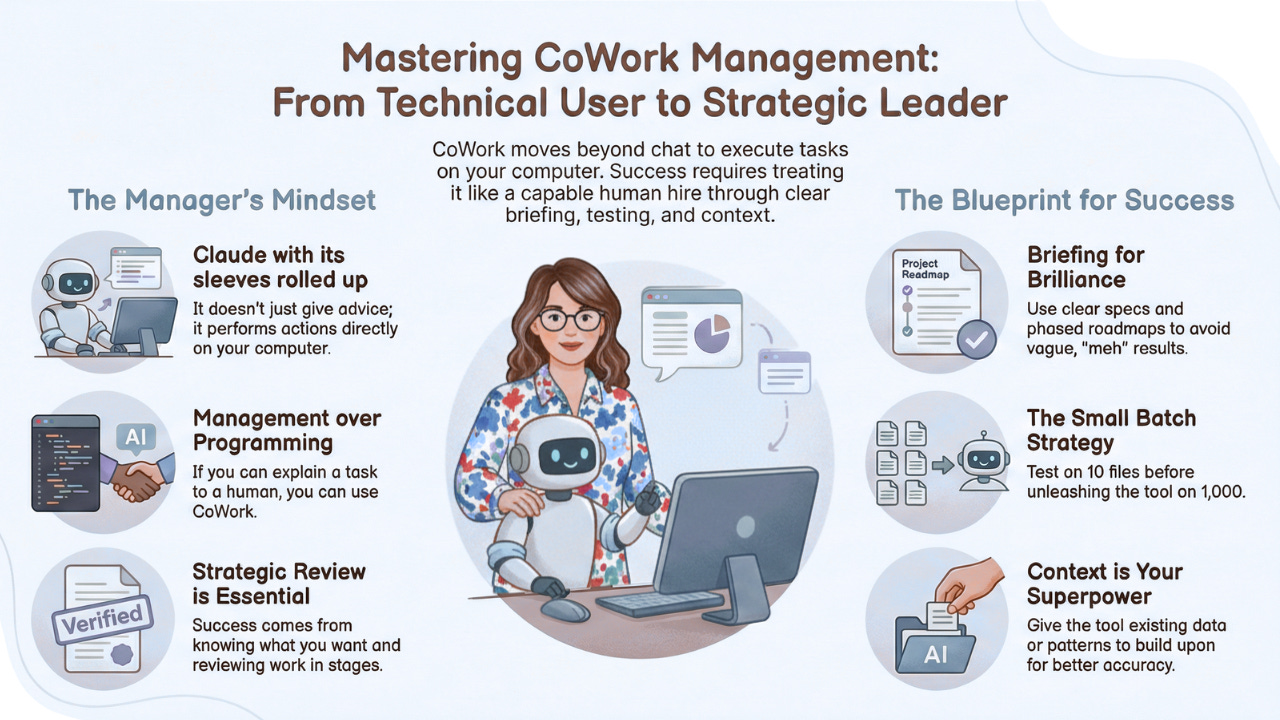
If You Only Remember This
If you only take away five things from this entire post, make it these.
1. CoWork is Claude with its sleeves rolled up. Instead of giving you advice in a chat window, it actually does the work on your computer. Same Claude, different mode.
2. The tool isn’t the hard part. The brief is. Vague instructions get vague results. Clear specs, a blueprint for judgment calls, and a phased roadmap make the difference between “meh” and “wow, that just saved me an entire weekend.”
3. You don’t need technical skills. You need management skills. If you can explain a task to a capable human, you can use CoWork. The skills that matter are knowing what you want, anticipating decisions, and reviewing in stages.
4. Start small. Always. Test on a batch of 10 files before you unleash it on 1,000. Review the first pass before trusting the rest. This isn’t being timid. This is being strategic.
5. Context is your superpower. My Midjourney renaming project worked because the original filenames already contained prompt information. CoWork wasn’t working blind. Give it something to build on and it builds well.
The Real Cost of Skipping the Thinking
I know what you might be thinking: “That planning sounds like a lot of work. Can’t I just... try it and see what happens?”
You can. And you might get lucky.
But here’s what “trying it and seeing what happens” actually costs. You spend 45 minutes watching CoWork do something you didn’t quite want. Then you spend another hour undoing what it did. Then you try again with slightly better instructions. Then you tweak again. And again.
Three hours later, you’ve “saved time” by spending more time than it would have taken to do it manually.
I know because that’s exactly the pattern I see with every new tool, not just CoWork. The tool gets blamed for the result. But the result was set the moment you skipped the thinking.
The 15 minutes I spent writing specs and a blueprint for each project? That wasn’t overhead. That was the entire reason the projects worked. It’s the same reason you’d never hand a contractor your house keys and say “renovate something.” You’d give them a plan first.
That friction you feel about slowing down to think before acting? That’s not weakness. That’s 17 years of business experience telling you something important: tools work when the thinking is done. Not before.
What Are You Putting Off?
Here’s what I’d love to know.
What’s the project on your computer that you keep putting off because the manual version feels overwhelming? The folder you haven’t touched in years. The files with names that mean nothing. The digital junk drawer you close as soon as you open it.
That’s probably a CoWork project. And the first step isn’t opening CoWork. It’s answering this: What does “done” look like, specifically, for you?
If you can answer that, you have your spec. And you’re already further than most people get.
Your turn…tell me what that project is. I’m genuinely curious.
And if you want help thinking through the specs-blueprint-roadmap for your specific situation, let’s talk. That’s exactly the kind of thinking work I do. Not pushing buttons for you. Helping you name what “done” looks like, because that’s harder than it sounds.