

TL;DR: Yes, you can build a good website with AI. My developer experience helped me spot what needed work, but you can get a good starting point without it. Start by checking whether the site makes sense to a first-time visitor and whether you can keep it up once it’s live.
When someone knows which questions to ask
There are a few things in my day-to-day routine where I question whether paying for the service is worth it versus doing it myself. Salon care is one of them.
Because of our travel schedule, I thought managing my haircuts myself would be the better option instead of finding a new stylist in whatever city we land. And for about two months, I make it work.
But then I realize that I am my own worst enemy. My hair is always pulled up or looks like I just stepped off the beach. It's long, thick, and unruly. And just when I'm ready to give in (I call it my shave-my-head moment), things start to work again, and I kick the can down the road. After all, it's a temporary fix that works, right?
But there really is something to be said about someone who knows their craft. Something no amount of YouTube videos or social reels can teach you. Something that takes years of practice and knowledge to master.
This is the point where I realize the money I'm saving is not worth the stress I'm living through. Add to that the time cost, because yes, that's affected too, and, well, I need help. The best part? The hubs is bald, and even he gets that sometimes you need to bite the bullet and get help from someone else.
My hair is getting a little darker, grayer, and heavier, and the texture is changing. My stylist knows how to work with these changes. She can think it out without it looking like an uneven mess. She knows what cuts and styles work for my face shape and texture, not to mention my lifestyle needs.
Most importantly, she knows when to say no. Do not add bangs. You will regret it tomorrow.
But she also knows the right questions to ask to make sure that whatever she gives me works.
So when I was looking at my revamped website, I realized I was the stylist this time. AI did the building. I knew what to ask and to plan for. I immediately recognized the little things most designers and developers would easily catch. But that was not the end. The message was off. It didn't match my way forward.
• ● • ● • ●•
Hi, I’m Lee. Welcome to DigiNav Compass Signal. Around here, I share what happens when AI and technology meet a real business—the useful parts, the messy parts, and what you can take into your own work.
Today, I’ll be showing you what I checked and changed when I redid my website with AI, what I chose to add (and leave out), and how I publish changes now, so you can judge whether an AI-built site fits the job you need yours to do.
• ● • ● • ●•
Why redo a site that already worked?
The site was okay. The design was brought over from WordPress, and it did its job.
So why redo it? A few things came together at once:
A new model. The new model version in Claude was worth trying.
The brand. The brand aesthetics weren't cohesive, and there were better guidelines now.
Known problems. As a developer, I knew some things were a problem (but Claude found them easily).
The visitor. The focus had honed in on the visitor, their journey, and the help I want to provide.
That last one mattered as much as the fixes. Web design is not just making sure that the pixels are perfect. You can have a beautifully designed site, but if your messaging is off or you're offering the wrong things, it's going to be just as bad.
Here's the prompt that kicked it off:
Review the website from a UI/UX standpoint and let me know where improvements are needed. Performance of course but things like consistency with design and brand, cohesive messaging, missed opportunities.

Repeat my underlying intent back to me and propose a plan of action for my review. Keep the plan proportionate to the goal.
Just by framing it like that, the AI came back with questions. Those questions meant sitting through the answers and the thinking, not just telling it what to do without being clear. Working through it with Claude Code was more thorough than any redo before it, and it was a chance to sit down and really think through the direction.
So the question wasn't whether AI could build a website. It was whether the site would do the job it needed to do: look like one brand, help a visitor find what they need, and keep the flat-file, no-database setup. If you have a site that's okay but not quite right, that's probably the same question in front of you.
• ● • ● • ●•
What to think about: What your working site still needs
Some of what needed fixing was so small you had to really look for it.
The global style sheets were not being applied correctly on all the pages. I could look at it and see variations, like a hue on a color or a size on a font. Mostly it was page to page. I'd go to one page and think, wait a minute, this is different than the other page. The global styles weren't being picked up, and it came down to the way new pages were rendered as opposed to old.
So we fixed all of that and put some solid guidelines in place. Now every page takes its colors, type, buttons, and spacing from one shared stylesheet instead of its own.
The other thing was the images. They weren't being correctly optimized. It was only a slight variation in page load speed, but I knew there was something. Smaller copies of the images fixed that part. It didn't fix every speed score on every page, and I'm not going to pretend it did.

Then there was the message. A site can look consistent and still say the wrong things to the wrong person. The pages got simpler, the articles got sorted by subject, and the Start here page now shows real examples from my own work so a visitor can recognize their situation.
Other people might not notice these little things, especially the styling issues. My developer experience helped me know what to look for. But that doesn't mean someone without that experience can't get a good starting point and improve it.
Design is important. Good designers and developers have skills that take years to build, just like my stylist. And a site with payments, courses, or scheduling needs extra attention no matter who builds it.
But for a lot of small business sites, experience makes the biggest difference: knowing your visitor, your message, and what you offer. That's the part you already have. No one should tell you a good site is out of reach because you didn't write the code yourself.
The tools are catching up with design best practices. Where you need to come in is the message, the visitor, the solutions, and your experiences. So if you're looking at your own site, start there:
Does the message match where you're going, not where you were?
Can a visitor find what they need without guessing?
Does each page point them to a solution you actually offer?
Do your own experiences show up, or could anyone have written it?
• ● • ● • ●•
What can go wrong: Adding features just because you can
Nothing actually went wrong here. But this is where it easily could have.
When AI can help you build almost anything, it's tempting to add it all. I needed to add some functionality, but not just because I could. Anything new had to fit what the site needed, give more control, and keep it future proof, or as close to it as possible.
That meant testing what fit.
E-commerce. Two options got a real test: ThriveCart, from a lifetime deal, and Kim's new SaySo, which gives more overall control. SaySo won.
Forms. The plan was an outside form tool. Instead, Claude helped build a custom form, without compromising the flat-file, no-database setup.
Flat files, in plain English
Many websites, including WordPress sites, keep their content in a database. When someone visits a page, the site pulls the content out of the database and puts the page together.
On this site, the content lives in files instead. The pages are prepared ahead of time, before anyone visits. So there's no site-content database to keep secure or to break.
Checkout and scheduling happen somewhere else. The e-commerce isn't on the site. It's a link that sends you to the service that handles it, and the same goes for scheduling.

Before you add something to your own site, ask:
Do I actually need this?
Does it give me more control or less?
What will it add to what I have to keep up with?
• ● • ● • ●•
What comes next: How changes go from preview to live
Your website isn't one and done. Even after it goes live, you need to keep making changes and improvements. Not complete site redos, but the everyday work: publishing articles, adjusting the message as your business and brand grow, things like that.
So how much work that takes matters. Here's how it compares for me.
With WordPress, you have to log in to the back end. You have to find what you need to change, look at it across the board on all of the devices, and then publish the change. For a blog article, in addition to drafting and editing the article, you also have to create the corresponding images, add the SEO, add the metadata, and make sure that everything is placed properly. There are a lot of little steps before you can publish.
Here's what it looks like now, with AI in each step:
Drafting. With the help of AI, the article is drafted and refined.
Images. Together, we create the images that support the message.
Publishing package. Using AI, we take all the pieces and combine them into a package. The process is designed so the images are placed in the ideal locations and the SEO and AEO is researched and added.
Preview. The package is then used to create a preview of the article, and AI sends back a preview link.
Publish. The only thing left is to look over the preview and approve it before telling it to push. And by push, I mean publish it live.
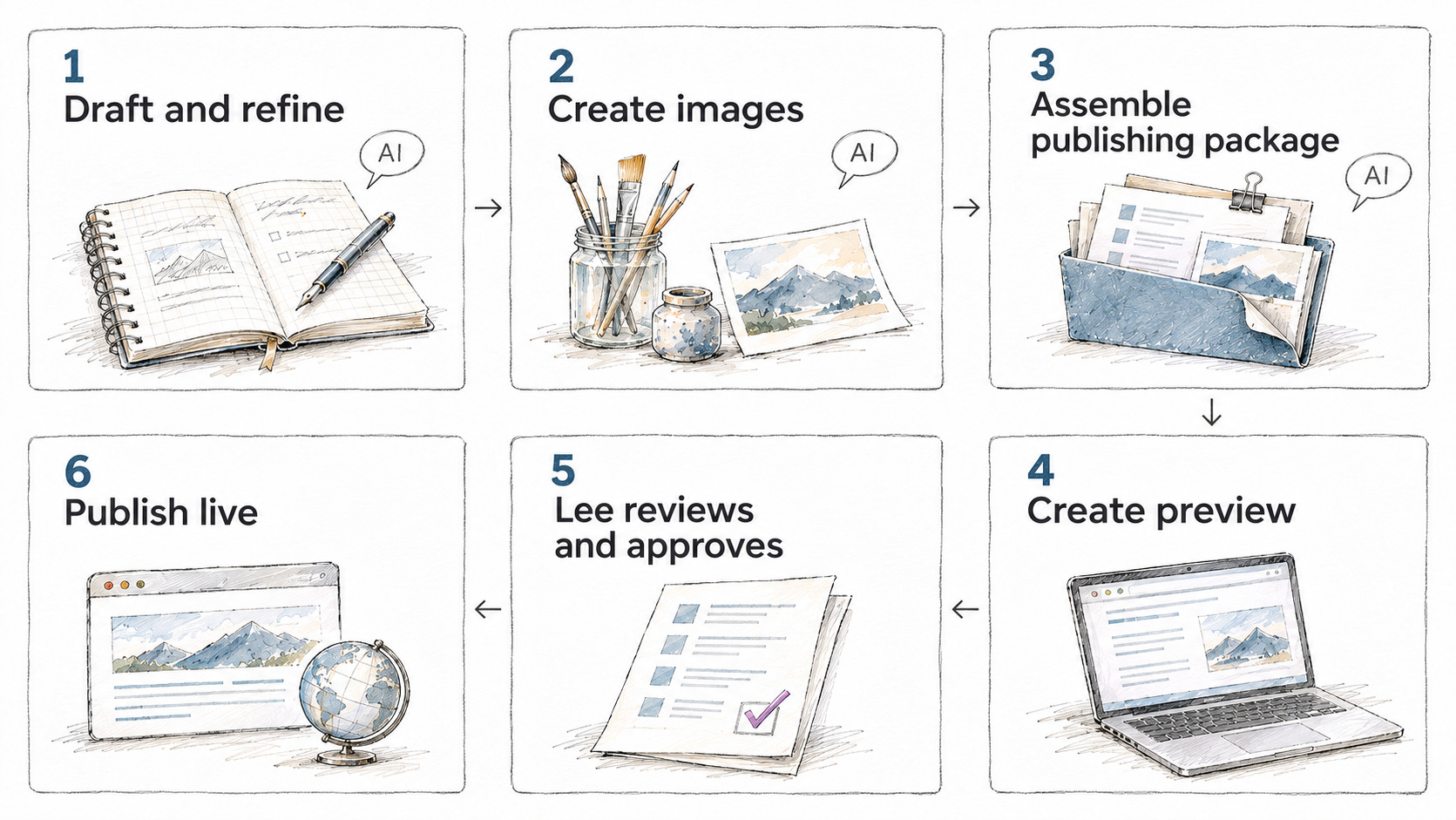
Changes to the site itself work the same way. Preview it, then push to live.
So it doesn't take any more effort. And if you're using AI, it actually takes less.
That's the best part: work with AI and let it do the hard work. GitHub keeps the history of my site files with every change I push, so I never have to remember a separate step to save them. And because I went with flat files, I don't have to worry about a database breaking.
Even if you don't feel AI savvy, it's not a hard process. Or you can have someone get you started.
It also changes where your money goes. You still need to invest in your site. But instead of paying to keep themes, plugins, and software up to date, you can put that money toward improving the site itself, like your message and your marketing.
People have asked me if I'm afraid I'd lose income by not needing to support WordPress. My answer is no, for exactly that reason.
• ● • ● • ●•
Where the site landed
So, can you build a good website with AI? Yes, you can.
Here's where this one landed:
The content lives in files. No site-content database to maintain or worry about breaking.
Checkout and scheduling stay with outside services. The site links to them instead of running them.
Nothing goes live without a preview. Every change and every article gets checked first, then pushed.
That second one was a decision of its own. AI could have helped build a checkout. But someone already built a good one, and they keep it running.
Part of building a good site is knowing what to hand off. You could build it, or you could rely on someone else. And knowing when to make that decision is just as important.
AI can do a lot of the building. What makes a site good is knowing what to ask and what to look for: the message, the visitor, the solutions, and the experience behind them. That part doesn't take a developer background. It takes knowing your business.
To see what that looks like for your own site, try this prompt. It checks both sides, because an inconsistent design is just as bad as an inconsistent message.
Here is my website: [paste your site's address]

Review it the way a first-time visitor would, in two parts.

1. Design: Look across several pages. Point out anything that changes from page to page when it shouldn't, like colors, fonts, buttons, spacing, or images.

2. Message: Tell me who you think this site is for, what problem it helps with, and what you think I want a visitor to do next. Point out anywhere the message is unclear, mixed, or doesn't lead to a clear next step.

Before you suggest any fixes, ask me questions about my business, my ideal visitor, and what I offer, one at a time, so your suggestions fit what I'm actually trying to do.
Paste in your site's address and go from there. Then reply and tell me what came up.
A good starting point gives you something to work with. Looking at it the way a first-time visitor would helps you see what to change next.
• ● • ● • ●•
Need help with a decision like this?
Deciding what to build and what to hand off is a real decision, and it's easier with a framework in front of you. The Decision Toolkit helps you work through one technology, AI, or automation decision before you commit. It includes printable guides and worksheets, an offline workbook, a 30-Day Review, and companion skill files for Claude and ChatGPT.
And if you're wondering whether your whole site needs a change, whether it was built with AI, runs on WordPress or Wix, or something else, I'm working on a website audit for exactly that. More on it soon.
Subscribers can find the Decision Toolkit in the perks.